Reference manual
This is an overview of all subjects that Quality-time can measure, all metrics that Quality-time can use to measure subjects, and all sources that Quality-time can use to collect data from to measure the metrics. For each supported combination of metric and source, the parameters that can be used to configure the source are listed.
Subjects
This is an overview of all the subjects that Quality-time can measure. For each subject, the metrics that can be used to measure the subject are listed.
Development environment
A software development and/or maintenance environment, consisting of infrastructure, pipelines, and tools needed to build, test, and deploy software.
Supporting metrics
Development tool
A software development and/or maintenance tool.
Supporting metrics
Pipeline and/or job
One or more pipelines and/or jobs to build, test, and deploy software.
Supporting metrics
Process
A software development, maintenance, and/or operations process.
Supporting metrics
Backlog management
A process to manage the product backlog.
Supporting metrics
Development process
A software development and/or maintenance process.
Supporting metrics
Operations process
A process to manage software in production.
Supporting metrics
Test process
A software test process.
Quality report
A software quality report.
Supporting metrics
Software
A custom software application or component.
Supporting metrics
Software documentation
Documentation of custom software.
Supporting metrics
Software source code
Source code of custom software.
Software tests
A test suite for custom software.
Team
A team developing, maintaining and/or operating custom software.
Supporting metrics
Metrics
This is an overview of all the metrics that Quality-time can use to measure subjects. For each metric, the default target, the supported scales, and the default tags are given. In addition, the sources that can be used to collect data from to measure the metric are listed.
Average issue lead time
The average lead time for changes completed in a certain time period.
Why measure average issue lead time? The shorter the lead time for changes, the sooner the new features can be used. Also, the shorter the lead time for changes, the fewer changes are in progress at the same time. Less context switching is needed and the risk of interfering changes is reduced.
- Evaluate metric against target by default
Yes
- Default target
≦ 10 days
- Scales
count
- Default tags
process efficiency
Supported subjects
Supporting sources
CI-pipeline duration
The duration of a CI-pipeline.
Why measure cI-pipeline duration? CI-pipelines that take too much time may signal something wrong with the build.
- Evaluate metric against target by default
Yes
- Default target
≦ 10 minutes
- Scales
count
- Default tags
ci
Supported subjects
Supporting sources
Change failure rate
The percentage of deployments causing a failure in production.
Why measure change failure rate? The change failure rate is an indicator of the DevOps effectiveness of a team.
How to configure change failure rate? Because this metric is a “rate”, it needs a source for the numerator (the number of failed deployments in the look back period) and a source for the denominator (the number of deployments in the look back period). The metric can be configured with a combination of Jira and either Jenkins or GitLab CI as source, or with Azure DevOps as only source.
When using Azure DevOps as source for the metric, it is used as source for both the number of failures (numerator) as well as for the number of deployments (denominator). So Azure DevOps needs to be added as source only once.
To configure Azure DevOps, provide a WIQL query that returns failed deployments. What issue type is used in Azure DevOps to represent failed deployments does not matter; Quality-time simply counts the number of issues returned by the query. Use the other parameters to select deployment pipelines. Also set the look-back period to the period that is to be reported on for both issues and pipelines.
When configuring Jira in combination with either Jenkins or GitLab CI, Jira is automatically used as source for the number of failures (numerator). Jenkins or GitLab CI is automatically used as source for the number of deployments (denominator).
To configure Jira, provide a JQL query that returns failed deployments. What issue type is used in Jira to represent failed deployments does not matter; Quality-time simply counts the number of issues returned by the query. Also set the look-back period to the period that is to be reported on.
To configure GitLab CI or Jenkins, set the look-back period to the period that is to be reported on and use the other parameters to select deployment jobs. Make sure the look-back period is the same as set for Jira.
- Evaluate metric against target by default
Yes
- Default target
≦ 0% of the failed deployments
- Scales
percentage
- Default tags
process efficiency
Supported subjects
Supporting sources
Commented out code
The number of blocks of commented out lines of code.
Why measure commented out code? Code should not be commented out because it bloats the sources and may confuse the reader as to why the code is still there, making the source code harder to understand and maintain. Unused code should be deleted. It can be retrieved from the version control system if needed.
See also
- Evaluate metric against target by default
Yes
- Default target
≦ 0 blocks
- Scales
count
- Default tags
maintainability
Supported subjects
Supporting sources
Complex units
The number of units (classes, functions, methods, files) that are too complex.
Why measure complex units? Complex code makes software harder to test and harder to maintain. Complex code is harder to test because there are more execution paths that need to be tested. Complex code is harder to maintain because it is harder to understand and analyze.
See also
- Evaluate metric against target by default
Yes
- Default target
≦ 0 complex units
- Scales
count (default)
percentage
- Default tags
maintainability
testability
Supported subjects
Supporting sources
Compliance
Keep track of compliance against standards or regulations.
Why measure compliance? Measure compliance to report progress and keep track of improvement actions.
- Evaluate metric against target by default
Yes
- Default target
≧ 100% of the compliance
- Scales
percentage
Supported subjects
Supporting sources
Dependencies
The number of (outdated) dependencies.
Why measure dependencies? Dependencies that are out of date can be considered a form of technical debt. On the one hand, not upgrading a dependency postpones the work of testing the new version. And, if the new version of a dependency has backwards-incompatible changes, it also postpones making adaptations to cater for those changes. On the other hand, upgrading the dependency may fix bugs and vulnerabilities, and unlock new features. Measuring the number of outdated dependencies provides insight into the size of this backlog.
- Evaluate metric against target by default
Yes
- Default target
≦ 0 dependencies
- Scales
count (default)
percentage
- Default tags
maintainability
Supported subjects
Supporting sources
Duplicated lines
The number of lines that are duplicated.
Why measure duplicated lines? Duplicate code makes software larger and thus potentially harder to maintain. Also, if the duplicated code contains bugs, they need to be fixed in multiple locations.
- Evaluate metric against target by default
Yes
- Default target
≦ 0 lines
- Scales
count (default)
percentage
- Default tags
maintainability
Supported subjects
Supporting sources
Failed CI-jobs
The number of continuous integration jobs or pipelines that have failed.
Why measure failed CI-jobs? Although it is to be expected that CI-jobs or pipelines will fail from time to time, a significant number of failed CI-jobs or pipelines over a longer period of time could be a sign that the continuous integration process is not functioning properly. Also, having many failed CI-jobs or pipelines makes it hard to see that additional jobs or pipelines start failing.
- Evaluate metric against target by default
Yes
- Default target
≦ 0 CI-jobs
- Scales
count
- Default tags
ci
Supported subjects
Supporting sources
Inactive branches
The number of branches that have been inactive for a while.
Why measure inactive branches? It is strange if branches have had no activity for a while and have not been merged to the default branch. Maybe commits have been cherry picked, or maybe the work has been postponed, but it also sometimes happen that someone simply forgets to merge the branch. Likewise, it is strange if branches are not deleted after having been merged to the default branch.
How to configure inactive branches? To change how soon Quality-time should consider branches to be inactive, use the parameter “Number of days since last commit after which to consider branches inactive”.
What exactly is the default branch is configured in GitLab or Azure DevOps. If you want to use a different branch
as default branch, you need to configure this in the source, see the documentation for
[GitLab](https://docs.gitlab.com/user/project/repository/branches/default/) or
[Azure DevOps](https://docs.microsoft.com/en-us/azure/devops/repos/git/manage-your-branches?view=azure-devops#    change-your-default-branch).
- Evaluate metric against target by default
Yes
- Default target
≦ 0 branches
- Scales
count
- Default tags
ci
Supported subjects
Supporting sources
Issues
The number of issues.
Why measure issues? What exactly issues are, depends on what is available in the source. The issues metric can for example be used to count the number of open bug reports, the number of ready user stories, or the number of overdue customer service requests. For sources that support a query language, the issues to be counted can be specified using the query language of the source.
- Evaluate metric against target by default
Yes
- Default target
≦ 0 issues
- Scales
count
Supported subjects
Supporting sources
Job runs within time period
The number of job runs within a specified time period.
Why measure job runs within time period? Frequent deployments are associated with smaller, less risky deployments and with lower lead times for new features.
- Evaluate metric against target by default
Yes
- Default target
≧ 30 CI-job runs
- Scales
count
- Default tags
ci
Supported subjects
Supporting sources
Long units
The number of units (functions, methods, files) that are too long.
Why measure long units? Long units are deemed harder to maintain.
- Evaluate metric against target by default
Yes
- Default target
≦ 0 long units
- Scales
count (default)
percentage
- Default tags
maintainability
Supported subjects
Supporting sources
Manual test duration
The duration of the manual test in minutes.
Why measure manual test duration? Preferably, all regression tests are automated. When this is not feasible, it is good to know how much time it takes to execute the manual tests, since they need to be executed before every release.
- Evaluate metric against target by default
Yes
- Default target
≦ 0 minutes
- Scales
count
- Default tags
test quality
Supported subjects
Supporting sources
Manual test execution
Measure the number of manual test cases that have not been tested on time.
Why measure manual test execution? Preferably, all regression tests are automated. When this is not feasible, it is good to know whether the manual regression tests have been executed recently.
- Evaluate metric against target by default
Yes
- Default target
≦ 0 manual test cases
- Scales
count
- Default tags
test quality
Supported subjects
Supporting sources
Many parameters
The number of units (functions, methods, procedures) that have too many parameters.
Why measure many parameters? Units with many parameters are deemed harder to maintain.
- Evaluate metric against target by default
Yes
- Default target
≦ 0 units with too many parameters
- Scales
count (default)
percentage
- Default tags
maintainability
Supported subjects
Supporting sources
Merge requests
The number of merge requests.
Why measure merge requests? Merge requests need to be reviewed and approved. This metric allows for measuring the number of merge requests without the required approvals.
How to configure merge requests? In itself, the number of merge requests is not indicative of software quality. However, by setting the parameter “Minimum number of upvotes”, the metric can report on merge requests that have fewer than the minimum number of upvotes. The parameter “Merge request state” can be used to exclude closed merge requests, for example. The parameter “Target branches to include” can be used to further limit the merge requests to only count merge requests that target specific branches, for example the “develop” branch.
- Evaluate metric against target by default
Yes
- Default target
≦ 0 merge requests
- Scales
count (default)
percentage
- Default tags
ci
Supported subjects
Supporting sources
Metrics
The number of metrics from one or more quality reports, with specific states and/or tags.
Why measure metrics? Use this metric to monitor other quality reports. For example, count the number of metrics that don’t meet their target value, or count the number of metrics that have been marked as technical debt for more than two months.
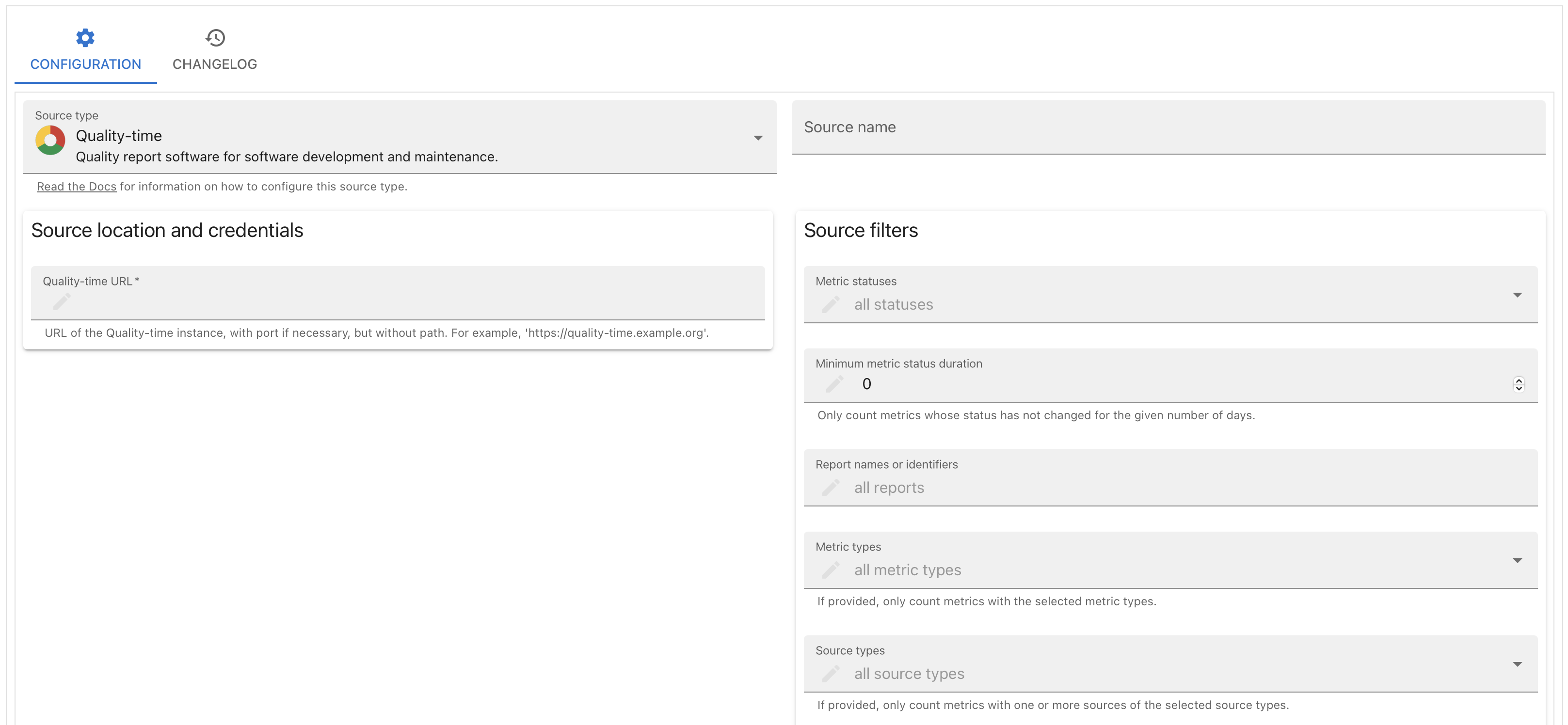
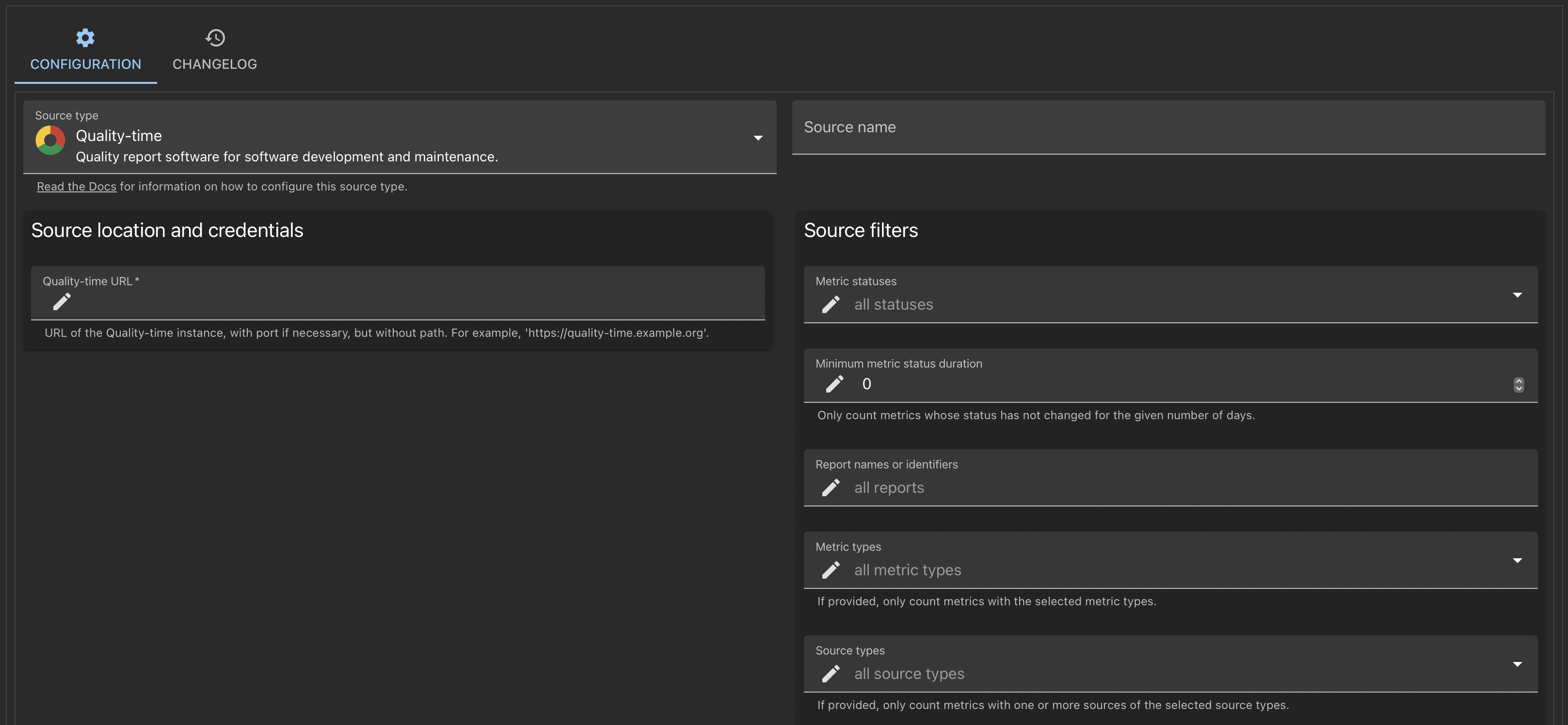
How to configure metrics? After adding Quality-time as a source to a “Metrics”-metric, one can configure which statuses to count and which metrics to consider by filtering on report names or identifiers, on metric types, on source types, and on tags.
Note
If the “Metrics” metric is itself part of the set of metrics it counts, a peculiar situation may occur: when you’ve configured the “Metrics” to count red metrics and its target is not met, the metric itself will become red and thus be counted as well. For example, if the target is at most five red metrics, and the number of red metrics increases from five to six, the “Metrics” value will go from five to seven. You can prevent this by making sure the “Metrics” metric is not in the set of counted metrics, for example by putting it in a different report and only count metrics in the other report(s).
- Evaluate metric against target by default
Yes
- Default target
≦ 0 metrics
- Scales
count (default)
percentage
Supported subjects
Supporting sources
Missing metrics
The number of metrics that can be added to each report, but have not been added yet.
Why measure missing metrics? Provide an overview of metrics still to be added to the quality report. If metrics will not be added, a reason can be documented.
- Evaluate metric against target by default
Yes
- Default target
≦ 0 missing metrics
- Scales
count (default)
percentage
Supported subjects
Supporting sources
Performancetest duration
The duration of the performancetest in minutes.
Why measure performancetest duration? Performance tests, especially endurance tests, may need to run for a minimum duration to give relevant results.
- Evaluate metric against target by default
Yes
- Default target
≧ 30 minutes
- Scales
count
- Default tags
performance
Supported subjects
Supporting sources
Performancetest stability
The duration of the performancetest at which throughput or error count increases.
Why measure performancetest stability? When testing endurance, the throughput and error count should remain stable for the complete duration of the performancetest. If throughput or error count starts to increase during the performancetest, this may indicate memory leaks or other resource problems.
- Evaluate metric against target by default
Yes
- Default target
≧ 100% of the minutes
- Scales
percentage
- Default tags
performance
Supported subjects
Supporting sources
Scalability
The number of virtual users (or percentage of the maximum number of virtual users) at which ramp-up of throughput breaks.
Why measure scalability? When stress testing, the load on the system-under-test has to increase sufficiently to detect the point at which the system breaks, as indicated by increasing throughput or error counts. If this breakpoint is not detected, the load has not been increased enough.
- Evaluate metric against target by default
Yes
- Default target
≧ 75 virtual users
- Scales
count (default)
percentage
- Default tags
performance
Supported subjects
Supporting sources
Security warnings
The number of security warnings about the software.
Why measure security warnings? Monitor security warnings about the software, its source code, dependencies, or infrastructure so vulnerabilities can be fixed before they end up in production.
- Evaluate metric against target by default
Yes
- Default target
≦ 0 security warnings
- Scales
count
- Default tags
security
Supported subjects
Sentiment
How are the team members feeling?
Why measure sentiment? Satisfaction is how fulfilled developers feel with their work, team, tools, or culture; well-being is how healthy and happy they are, and how their work impacts it. Measuring satisfaction and well-being can be beneficial for understanding productivity and perhaps even for predicting it. For example, productivity and satisfaction are correlated, and it is possible that satisfaction could serve as a leading indicator for productivity; a decline in satisfaction and engagement could signal upcoming burnout and reduced productivity.
- Evaluate metric against target by default
Yes
- Default target
≧ 10
- Scales
count
Supported subjects
Supporting sources
Size (LOC)
The size of the software in lines of code.
Why measure size (LOC)? The size of software is correlated with the effort it takes to maintain it. Lines of code is one of the most widely used metrics to measure size of software.
How to configure size (LOC)? To track the absolute size of the software, set the scale of the metric to ‘count’ and add one or more sources.
To track the relative size of sources, set the scale of the metric to ‘percentage’ and add cloc as source. Make sure
to generate cloc JSON reports with the --by-file option so that filenames are included in the JSON reports. Use the
‘files to include’ field to select the sources that should be compared to the total amount of code. For example, to
measure the relative amount of test code, use the regular expression .*test.*.
Note
Unfortunately, SonarQube can only used to measure the absolute size of the software. SonarQube does not report the sizes of files with test code for all programming languages. Hence it cannot be used to measure the relative size of test code.
- Evaluate metric against target by default
Yes
- Default target
≦ 30000 lines
- Scales
count (default)
percentage
- Default tags
maintainability
Supported subjects
Supporting sources
Slow transactions
The number of transactions slower than their target response time.
Why measure slow transactions? Transactions slower than their target response time indicate performance problems that need attention.
- Evaluate metric against target by default
Yes
- Default target
≦ 0 transactions
- Scales
count
- Default tags
performance
Supported subjects
Supporting sources
Software version
The version number of the software as analyzed by the source.
Why measure software version? Monitor that the version of the software is at least a specific version or get notified when the software version becomes higher than a specific version.
More information Quality-time uses the packaging library (1) to parse version numbers. The packaging library expects version numbers to comply with PEP-440 (2). PEP is an abbreviation for Python Enhancement Proposal, but this PEP is primarily a standard for version numbers. PEP-440 encompasses most of the semantic versioning scheme (3) so version numbers that follow semantic versioning are usually parsed correctly.
- Evaluate metric against target by default
No
- Default target
≧ 1.0
- Scales
version_number
- Default tags
ci
Supported subjects
Supporting sources
Source up-to-dateness
The number of days since the source was last updated.
Why measure source up-to-dateness? If the information provided by sources is outdated, so will be the metrics in Quality-time. Hence it is important to monitor that sources are up-to-date.
- Evaluate metric against target by default
Yes
- Default target
≦ 3 days
- Scales
count
- Default tags
ci
Supported subjects
Supporting sources
Source version
The version number of the source. Also shows when update is possible for sources that use GitHub releases.
Why measure source version? Monitor that the version of a source is at least a specific version or get notified when the version becomes higher than a specific version.
How to configure source version? If you decide with your development team that you are only interested in the major and minor updates of tools and want to ignore any patch updates, then the following settings can be helpful.
Tip
Leave the metric direction default, i.e. a higher version number is better. Set the metric target to the first two digits of the latest available software version. So if the latest is 3.9.4, set it to 3.9. Set the metric near target to only the first digit, so in this example that will be 3.
The result will be that when there is a minor update, this metric will turn yellow. So, suppose the version of your tool is at version 2.12.15 and the latest version available is 2.13.2, then this metric will turn yellow. If there is only a patch update, the metric will stay green. If there is a major update, the metric will turn red. So when we have 2.9.3 and the version available is 3.9.1, then the metric will turn red.
More information Quality-time uses the packaging library (1) to parse version numbers. The packaging library expects version numbers to comply with PEP-440 (2). PEP is an abbreviation for Python Enhancement Proposal, but this PEP is primarily a standard for version numbers. PEP-440 encompasses most of the semantic versioning scheme (3) so version numbers that follow semantic versioning are usually parsed correctly.
- Evaluate metric against target by default
Yes
- Default target
≧ 1.0
- Scales
version_number
- Default tags
ci
Supported subjects
Suppressed violations
The number of violations suppressed in the source.
Why measure suppressed violations? Some tools allow for suppression of violations. Having the number of suppressed violations violations visible in Quality-time allows for a double check of the suppressions.
- Evaluate metric against target by default
Yes
- Default target
≦ 0 suppressed violations
- Scales
count (default)
percentage
- Default tags
maintainability
Supported subjects
Supporting sources
Test branch coverage
The number of code branches not covered by tests.
Why measure test branch coverage? Code branches not covered by tests may contain bugs and signal incomplete tests.
- Evaluate metric against target by default
Yes
- Default target
≦ 0 uncovered branches
- Scales
count (default)
percentage
- Default tags
test quality
Supported subjects
Supporting sources
Test cases
The number of test cases.
Why measure test cases? Track the test results of test cases so there is traceability from the test cases, defined in Jira, to the test results in test reports produced by tools such as Robot Framework or Junit.
How to configure test cases? The test cases metric reports on the number of test cases, and their test results. The test case metric is different than other metrics because it combines data from two types of sources: it needs one or more sources for the test cases, and one or more sources for the test results. The test case metric then matches the test results with the test cases.
Currently, only Jira is supported as source for the test cases. Test report sources such as JUnit, TestNG, and Robot Framework are supported as source for the test results. To configure the test cases metric, you need to add at least one Jira source and one test report source. In addition, to allow the test case metric to match test cases from Jira with test results from the test reports files, the test results should mention Jira issue keys in the title or description of tests or the name of test suites.
Suppose you have configured Jira with the query: project = "My Project" and type = "Logical Test Case" and this
results in these test cases:
Key |
Summary |
|---|---|
MP-1 |
Test case 1 |
MP-2 |
Test case 2 |
MP-3 |
Test case 3 |
MP-4 |
Test case 4 |
Also suppose your JUnit XML has the following test results:
<testsuite name="suite 1" tests="5" errors="0" failures="1" skipped="1">
<testcase name="MP-1; step 1">
    <failure />
</testcase>
<testcase name="MP-1; step 2">
    <skipped />
</testcase>
<testcase name="MP-2">
    <skipped />
</testcase>
<testcase name="MP-3; step 1"/>
<testcase name="MP-3; step 2"/>
</testsuite>
The test case metric will combine the JUnit XML file with the test cases from Jira and report one failed, one skipped, one passed, and one untested test case:
Key |
Summary |
Test result |
|---|---|---|
MP-1 |
Test case 1 |
failed |
MP-2 |
Test case 2 |
skipped |
MP-3 |
Test case 3 |
passed |
MP-4 |
Test case 4 |
untested |
If multiple test results in the test report file map to one Jira test case (as with MP-1 and MP-3 above), by default the test results are aggregated strictly, meaning that the ‘worst’ test result for each test case is reported. Possible test results from worst to best are: errored, failed, skipped, and passed. Test cases not found in the test results are listed as untested (as with MP-4 above). It is also possible to aggregate the test results leniently, meaning that the ‘best’ test result for each test case is reported. Use the ‘test result aggregation strategy’ parameter of test report sources to switch between strict and lenient.
In addition to linking individual test results to Jira test cases, it’s also possible to link test suites to Jira test cases. For example:
<testsuites>
    <testsuite name="suite 1;MP-1" tests="3" errors="0" failures="1" skipped="2">
        <testcase name="test case 1">
            <failure />
        </testcase>
        <testcase name="test case 2">
            <skipped />
        </testcase>
        <testcase name="test case 3">
            <skipped />
        </testcase>
    </testsuite>
    <testsuite name="suite 2;MP-2" tests="2" errors="0" failures="0" skipped="0">
        <testcase name="test case 4"/>
        <testcase name="test case 5"/>
    </testsuite>
</testsuites>
The test case metric will combine the JUnit XML file with the test cases from Jira and report one failed, one passed, and two untested test cases:
Key |
Summary |
Test result |
|---|---|---|
MP-1 |
Test case 1 |
failed |
MP-2 |
Test case 2 |
passed |
MP-3 |
Test case 3 |
untested |
MP-4 |
Test case 4 |
untested |
Like before, if multiple test results in the test report file map to one Jira test case (as with MP-1 and MP-2 above), the ‘worst’ test result is reported. Test cases not found in the test results are listed as untested (as with MP-3 and MP-4 above).
- Evaluate metric against target by default
Yes
- Default target
≧ 0 test cases
- Scales
count (default)
percentage
- Default tags
test quality
Supported subjects
Supporting sources
Test line coverage
The number of lines of code not covered by tests.
Why measure test line coverage? Code lines not covered by tests may contain bugs and signal incomplete tests.
- Evaluate metric against target by default
Yes
- Default target
≦ 0 uncovered lines
- Scales
count (default)
percentage
- Default tags
test quality
Supported subjects
Supporting sources
Test results
The number of executed tests.
Why measure test results? Keep track of the total number of executed tests or the number of executed tests with specific results, for example skipped, failed or errored.
- Evaluate metric against target by default
Yes
- Default target
≧ 0 tests
- Scales
count (default)
percentage
- Default tags
test quality
Supported subjects
Test suite results
The number of executed test suites.
Why measure test suite results? Keep track of the total number of executed test suites or the number of executed test suites with specific results, for example skipped, failed or errored.
- Evaluate metric against target by default
Yes
- Default target
≧ 0 test suites
- Scales
count (default)
percentage
- Default tags
test quality
Supported subjects
Supporting sources
Time remaining
The number of days remaining until a date in the future.
Why measure time remaining? Keep track of the time remaining until for example a release date, the end date of a policy, or the next team building retreat.
- Evaluate metric against target by default
Yes
- Default target
≧ 28 days
- Scales
count
Supported subjects
Supporting sources
Todo and fixme comments
The number of todo and fixme comments in source code.
Why measure todo and fixme comments? Code should not contain traces of unfinished work. The presence of todo and fixme comments may be indicative of technical debt or hidden defects.
See also
- Evaluate metric against target by default
Yes
- Default target
≦ 0 todo and fixme comments
- Scales
count
- Default tags
maintainability
Supported subjects
Supporting sources
Unused CI-jobs
The number of continuous integration jobs that are unused.
Why measure unused CI-jobs? Removing unused, obsolete CI-jobs helps to keep a clear overview of the relevant CI-jobs.
- Evaluate metric against target by default
Yes
- Default target
≦ 0 CI-jobs
- Scales
count
- Default tags
ci
Supported subjects
Supporting sources
User story points
The total number of points of a selection of user stories.
Why measure user story points? Keep track of the number of user story points so the team has sufficient ‘ready’ stories to plan the next sprint.
- Evaluate metric against target by default
Yes
- Default target
≧ 100 user story points
- Scales
count
- Default tags
process efficiency
Supported subjects
Supporting sources
Velocity
The average number of user story points delivered in recent sprints.
Why measure velocity? Keep track of the velocity so the team knows how many story points need at least be ‘ready’ to plan the next sprint
- Evaluate metric against target by default
Yes
- Default target
≧ 20 user story points per sprint
- Scales
count
- Default tags
process efficiency
Supported subjects
Supporting sources
Violation remediation effort
The amount of effort it takes to remediate violations.
Why measure violation remediation effort? To better plan the work to remediate violations, it is helpful to have an estimate of the amount of effort it takes to remediate them.
- Evaluate metric against target by default
Yes
- Default target
≦ 60 minutes
- Scales
count
- Default tags
maintainability
Supported subjects
Supporting sources
Violations
The number of violations of rules in the software.
Why measure violations? Depending on what kind of rules or guideliens the source checks, violations may pose a risk for different quality characteristics of the software. For example, the more programming rules are violated, the harder it may be to understand and maintain the software (1, 2). And the more accessibility guidelines are violated, the harder it may be for users to use the software (3).
See also
- Evaluate metric against target by default
Yes
- Default target
≦ 0 violations
- Scales
count
Supported subjects
Supporting sources
Sources
This is an overview of all the sources that Quality-time can use to measure metrics. For each source, the metrics that the source can measure are listed. Also, a link to the source’s own documentation is provided.
Anchore
Anchore image scan analysis report in JSON format.
Supported metrics
Anchore Jenkins plugin
A Jenkins job with an Anchore report produced by the Anchore Jenkins plugin.
Supported metrics
See also
Axe CSV
An Axe accessibility report in CSV format.
Supported metrics
See also
Homepage: https://github.com/ICTU/axe-reports
Axe HTML reporter
Creates an HTML report from the axe-core library AxeResults object.
Supported metrics
See also
Axe-core
Axe is an accessibility testing engine for websites and other HTML-based user interfaces.
Supported metrics
See also
Homepage: https://github.com/dequelabs/axe-core
Azure DevOps Server
Azure DevOps Server (formerly known as Team Foundation Server) by Microsoft provides source code management, reporting, requirements management, project management, automated builds, testing and release management.
Supported metrics
See also
Bandit
Bandit is a tool designed to find common security issues in Python code.
Supported metrics
See also
Homepage: https://github.com/PyCQA/bandit
Bitbucket
Bitbucket is a version control platform by Atlassian that supports Git, enabling developers to collaborate on code with features like pull requests, CI/CD, and seamless integration with tools like Jira and Trello.
Supported metrics
Calendar date
Specify a specific date in the past or the future. Can be used to, for example, warn when it is time for the next security test.
Supported metrics
Cargo Audit
Cargo Audit is a linter for Rust Cargo.lock files for crates.
Supported metrics
See also
Cobertura
Cobertura is a free Java tool that calculates the percentage of code accessed by tests.
Supported metrics
See also
Homepage: https://cobertura.github.io/cobertura/
Cobertura Jenkins plugin
Jenkins plugin for Cobertura, a free Java tool that calculates the percentage of code accessed by tests.
Deprecated
Support for using Cobertura Jenkins plugin as source is deprecated. See this GitHub issue for more information.
Supported metrics
See also
Homepage: https://plugins.jenkins.io/cobertura/
Composer
A Dependency Manager for PHP.
Supported metrics
See also
Homepage: https://getcomposer.org/
Dependency-Track
Dependency-Track is a component analysis platform that allows organizations to identify and reduce risk in the software supply chain.
Supported metrics
See also
Homepage: https://dependencytrack.org/
Repository: https://github.com/DependencyTrack/dependency-track
Gatling
Gatling is an open-source load testing solution, designed for continuous load testing and development pipeline integration.
Supported metrics
See also
Homepage: https://gatling.io/
GitHub
GitHub provides a cloud-based hosting service for Git repositories, offering tools for version control, source code management, pull requests, issue tracking, and continuous integration/continuous deployment (CI/CD).
Supported metrics
See also
Homepage: https://github.com/about
GitLab
GitLab provides Git-repositories, wiki’s, issue-tracking and continuous integration/continuous deployment pipelines.
Note
Some metric sources are documents in JSON, XML, CSV, or HTML format. Examples include JUnit XML reports, JaCoCo XML reports and Axe CSV reports. Usually, you add a JUnit (or JaCoCo, or Axe…) source and then simply configure the same URL that you use to access the document via the browser. Unfortunately, this does not work if the document is stored in GitLab. In that case, you still use the JUnit (or JaCoCo, or Axe…) source, but provide a GitLab API URL as URL. Depending on where the document is stored in GitLab, there are two scenarios; the source is a build artifact of a GitLab CI pipeline, or the source is stored in a GitLab repository:
When the metric source is a build artifact of a GitLab CI pipeline, use URLs of the following format:
https://<gitlab-server>/api/v4/projects/<project-id>/jobs/artifacts/<branch>/raw/<path>/<to>/<file-name>?job=<job-name>The project id can be found under the project’s general settings.
If the repository is private, you also need to provide a personal access token with the scope
read_apiin the private token field.Warning
Artifacts can only be downloaded from a completed pipeline with status
success. Consider settingallow_failure: trueon test jobs in the pipeline.When the metric source is a file stored in a GitLab repository, use URLs of the following format:
https://<gitlab-server>/api/v4/projects/<project-id>/repository/files/<file-path-with-slashes-%2F-encoded>/raw?ref=<branch>The project id can be found under the project’s general settings.
If the repository is private, you also need to provide a personal access token with the scope
read_repositoryin the private token field.
Supported metrics
See also
Homepage: https://about.gitlab.com/
Grafana k6
K6 is an open-source load testing tool developed by Grafana Labs. It is designed to help developers test the performance and reliability of their systems.
Supported metrics
See also
Homepage: https://k6.io/
Harbor
Harbor is an open source registry that secures artifacts with policies and role-based access control, ensures images are scanned and free from vulnerabilities, and signs images as trusted.
Supported metrics
See also
Homepage: https://goharbor.io/
Harbor JSON
Harbor is an open source registry that secures artifacts with policies and role-based access control, ensures images are scanned and free from vulnerabilities, and signs images as trusted. Use Harbor JSON as source for accessing vulnerability reports downloaded from the Harbor API in JSON format.
Supported metrics
See also
Homepage: https://goharbor.io/
JMeter CSV
Apache JMeter application is open source software, a 100% pure Java application designed to load test functional behavior and measure performance.
Supported metrics
See also
Homepage: https://jmeter.apache.org/
JMeter JSON
Apache JMeter application is open source software, a 100% pure Java application designed to load test functional behavior and measure performance.
Supported metrics
See also
Homepage: https://jmeter.apache.org/
JSON file with security warnings
A generic vulnerability report with security warnings in JSON format.
In some cases, there are security vulnerabilities not found by automated tools. Quality-time has the ability to parse security warnings from JSON files with a generic format.
The JSON format consists of an object with one key vulnerabilities. The value should be a list of vulnerabilities.
Each vulnerability is an object with three keys: title, description, and severity. The title and description
values should be strings. The severity is also a string and can be either low, medium, or high.
Example generic JSON file:
{
    "vulnerabilities": [
        {
            "title": "ISO27001:2013 A9 Insufficient Access Control",
            "description": "The Application does not enforce Two-Factor Authentication and therefore does not satisfy                 security best practices.",
            "severity": "high"
        },
        {
            "title": "Threat Model Finding: Uploading Malicious Files",
            "description": "An attacker can upload malicious files with low privileges that can perform direct API                 calls and perform unwanted mutations or see unauthorized information.",
            "severity": "medium"
        }
    ]
}
Supported metrics
JUnit XML report
Test reports in the JUnit XML format.
Supported metrics
See also
Homepage: https://junit.org/
JaCoCo
JaCoCo is an open-source tool for measuring and reporting Java code coverage.
Supported metrics
See also
Homepage: https://www.eclemma.org/jacoco/
JaCoCo Jenkins plugin
A Jenkins job with a JaCoCo coverage report produced by the JaCoCo Jenkins plugin.
Supported metrics
See also
Homepage: https://plugins.jenkins.io/jacoco
Jenkins
Jenkins is an open source continuous integration/continuous deployment server.
Note
Some metric sources are documents in JSON, XML, CSV, or HTML format. Examples include JUnit XML reports, JaCoCo XML reports and Axe CSV reports. Usually, you add a JUnit (or JaCoCo, or Axe…) source and then simply configure the same URL that you use to access the document via the browser. If the document is stored in Jenkins and Quality-time needs to be authorized to access resources in Jenkins, there are two options:
Configure a Jenkins user and password. The username of the Jenkins user needs to be entered in the “Username” field and the password in the “Password” field.
Configure a Jenkins user and a private token of that user. The username of the Jenkins user needs to be entered in the “Username” field and the private token in the “Password” field.
Supported metrics
See also
Homepage: https://www.jenkins.io/
Repository: https://github.com/jenkinsci/jenkins
Jenkins test report
A Jenkins job with test results.
Supported metrics
See also
Homepage: https://plugins.jenkins.io/junit
Jira
Jira is a proprietary issue tracker developed by Atlassian supporting bug tracking and agile project management.
Supported metrics
See also
Homepage: https://www.atlassian.com/software/jira
Manual number
A number entered manually by a Quality-time user.
The manual number source supports all metric types that take a number as value. Because users have to keep the value up to date by hand, this source is only meant to be used as a temporary solution for when no automated source is available yet. For example, when the results of a security audit are only available in a PDF-report, a ‘security warnings’ metric can be added with the number of findings as manual number source. Note: only non-negative integer values (0, 1, 2, 3, …) are allowed.
Supported metrics
NCover
A .NET code coverage solution.
Supported metrics
See also
Homepage: https://www.ncover.com/
OJAudit
An Oracle JDeveloper program to audit Java code against JDeveloper’s audit rules.
Supported metrics
See also
OWASP Dependency-Check JSON
OWASP Dependency-Check is a utility that identifies project dependencies and checks if there are any known, publicly disclosed, vulnerabilities.
Supported OWASP Dependency-Check JSON versions
≥9.0, ≤9.2
Supported metrics
See also
OWASP Dependency-Check XML
OWASP Dependency-Check is a utility that identifies project dependencies and checks if there are any known, publicly disclosed, vulnerabilities.
Supported OWASP Dependency-Check XML versions
≥9.0, ≤9.2
Supported metrics
See also
OWASP ZAP
The OWASP Zed Attack Proxy (ZAP) can help automatically find security vulnerabilities in web applications while the application is being developed and tested.
Supported metrics
See also
Homepage: https://www.zaproxy.org/
Repository: https://github.com/zaproxy/zaproxy
OpenVAS
OpenVAS (Open Vulnerability Assessment System) is a software framework of several services and tools offering vulnerability scanning and vulnerability management.
Supported metrics
See also
Homepage: https://www.openvas.org/
Repository: https://github.com/greenbone/openvas-scanner
Performancetest-runner
An open source tool to run performancetests and create performancetest reports.
Supported metrics
See also
Pyupio Safety
Safety checks Python dependencies for known security vulnerabilities.
Supported metrics
See also
Homepage: https://github.com/pyupio/safety
Quality-time
Quality report software for software development and maintenance.
Supported metrics
See also
Homepage: https://github.com/ICTU/quality-time
Robot Framework
Robot Framework is a generic open source automation framework for acceptance testing, acceptance test driven development, and robotic process automation.
Supported metrics
See also
Homepage: https://robotframework.org/
Repository: https://github.com/robotframework/robotframework
Robot Framework Jenkins plugin
A Jenkins plugin for Robot Framework, a generic open source automation framework for acceptance testing, acceptance test driven development, and robotic process automation.
Supported metrics
See also
Homepage: https://plugins.jenkins.io/robot/
SARIF
A Static Analysis Results Interchange Format (SARIF) vulnerability report in JSON format.
Supported metrics
See also
Snyk
Snyk vulnerability report in JSON format.
Supported metrics
SonarQube
SonarQube Server is an on-premise analysis tool designed to detect coding issues in 30+ languages, frameworks, and infrastructure-as-code platforms.
Supported SonarQube versions
≥10.2
Supported metrics
See also
TestNG
Test reports in the TestNG XML format.
Supported metrics
See also
Homepage: https://testng.org/
Trello
Trello is a collaboration tool that organizes projects into boards.
Deprecated
Support for using Trello as source is deprecated. See this GitHub issue for more information.
Supported metrics
See also
Homepage: https://trello.com/
Trivy JSON
A Trivy vulnerability report in JSON format.
Supported metrics
See also
Visual Studio TRX
Test reports in the Visual Studio TRX format.
Supported metrics
cloc
cloc is an open-source tool for counting blank lines, comment lines, and physical lines of source code in many programming languages.
Supported metrics
See also
Homepage: https://github.com/AlDanial/cloc
npm
npm is a package manager for the JavaScript programming language.
Supported metrics
See also
Homepage: https://docs.npmjs.com/
pip
pip is the package installer for Python. You can use pip to install packages from the Python Package Index and other indexes.
Supported metrics
See also
Homepage: https://pip.pypa.io/en/stable/
Metric-source combinations
This is an overview of all supported combinations of metrics and sources. For each combination of metric and source, the mandatory and optional parameters are listed that can be used to configure the source to measure the metric. If Quality-time needs to make certain assumptions about the source, for example which SonarQube rules to use to count long methods, then these assumptions are listed under ‘configurations’.
Average issue lead time from Azure DevOps Server
Azure DevOps Server can be used to measure average issue lead time.
Mandatory parameters
URL including organization and project. URL of the Azure DevOps instance, with port if necessary, and with organization and project. For example: ‘https://dev.azure.com/{organization}/{project}’.
Optional parameters
Issue query in WIQL (Work Item Query Language). This should only contain the WHERE clause of a WIQL query, as the selected fields are static. For example, use the following clause to hide issues marked as done: “[System.State] <> ‘Done’”. See https://docs.microsoft.com/en-us/azure/devops/boards/queries/wiql-syntax?view=azure-devops.
Number of days to look back for work items. Work items are selected if they are completed and have been updated within the number of days configured. The default value is:
90.Private token.
Average issue lead time from Jira
Jira can be used to measure average issue lead time.
Mandatory parameters
API version. Version of the API (application programming interface) to use for retrieving information. This is a single choice parameter. Possible values are:
v2,v3. The default value is:v2.Issue query in JQL (Jira Query Language).
URL. URL of the Jira instance, with port if necessary. For example, ‘https://jira.example.org’.
Optional parameters
Number of days to look back for selecting issues. Issues are selected if they are completed and have been updated within the number of days configured. The default value is:
90.Password for basic authentication.
Private token.
Username for basic authentication.
CI-pipeline duration from Azure DevOps Server
Azure DevOps Server can be used to measure ci-pipeline duration.
Mandatory parameters
URL including organization and project. URL of the Azure DevOps instance, with port if necessary, and with organization and project. For example: ‘https://dev.azure.com/{organization}/{project}’.
Optional parameters
Pipeline selection. Which pipeline(s) to select from the set of pipelines that match the filter criteria? This is a single choice parameter. Possible values are:
average,latest,slowest. The default value is:slowest.Pipelines to ignore (regular expressions or pipeline names). Pipelines to ignore can be specified by pipeline name or by regular expression. Use {folder name}/{pipeline name} for the names of pipelines in folders.
Pipelines to include (regular expressions or pipeline names). Pipelines to include can be specified by pipeline name or by regular expression. Use {folder name}/{pipeline name} for the names of pipelines in folders.
Private token.
CI-pipeline duration from GitLab
GitLab can be used to measure ci-pipeline duration.
Mandatory parameters
GitLab instance URL. URL of the GitLab instance, with port if necessary, but without path. For example, ‘https://gitlab.com’.
Project (name with namespace or id).
Optional parameters
Branches (regular expressions or branch names).
Number of days to look back for selecting pipelines. The default value is:
7.Pipeline schedules to include. Pipeline schedules to include can be specified by description or by regular expression.
Pipeline selection. Which pipeline(s) to select from the set of pipelines that match the filter criteria? This is a single choice parameter. Possible values are:
average,latest,slowest. The default value is:slowest.Pipeline statuses to include. This is a multiple choice with defaults parameter. Possible values are:
canceled,created,failed,manual,pending,preparing,running,scheduled,skipped,success,waiting for resource. The default value is: all values.Pipeline triggers to include. This is a multiple choice with defaults parameter. Possible values are:
api,chat,external pull request event,external,merge request event,ondemand DAST scan,ondemand DAST validation,parent pipeline,pipeline,push,schedule,trigger,web-IDE,web. The default value is: all values.Private token (with read_api scope).
CI-pipeline duration from Jenkins
Jenkins can be used to measure ci-pipeline duration.
Mandatory parameters
Pipeline (multibranch pipeline name).
URL. URL of the Jenkins instance, with port if necessary, but without path. For example, ‘https://jenkins.example.org’.
Optional parameters
Branches (regular expressions or branch names). Branches only apply to multibranch pipelines.
Build result types. Limit which build result types to include. This is a multiple choice with defaults parameter. Possible values are:
Aborted,Failure,Not built,Success,Unstable. The default value is: all values.Password or API token for basic authentication.
Username for basic authentication.
CI-pipeline duration from Manual number
Manual number can be used to measure ci-pipeline duration.
Mandatory parameters
Number. The default value is:
0.
Change failure rate from Azure DevOps Server
Azure DevOps Server can be used to measure change failure rate.
Mandatory parameters
URL including organization and project. URL of the Azure DevOps instance, with port if necessary, and with organization and project. For example: ‘https://dev.azure.com/{organization}/{project}’.
Optional parameters
Issue query in WIQL (Work Item Query Language). This should only contain the WHERE clause of a WIQL query, as the selected fields are static. For example, use the following clause to hide issues marked as done: “[System.State] <> ‘Done’”. See https://docs.microsoft.com/en-us/azure/devops/boards/queries/wiql-syntax?view=azure-devops.
Number of days to look back for selecting pipeline runs. The default value is:
90.Number of days to look back for work items. Work items are selected if they are completed and have been updated within the number of days configured. The default value is:
90.Pipelines to ignore (regular expressions or pipeline names). Pipelines to ignore can be specified by pipeline name or by regular expression. Use {folder name}/{pipeline name} for the names of pipelines in folders.
Pipelines to include (regular expressions or pipeline names). Pipelines to include can be specified by pipeline name or by regular expression. Use {folder name}/{pipeline name} for the names of pipelines in folders.
Private token.
Change failure rate from GitLab
GitLab can be used to measure change failure rate.
Mandatory parameters
GitLab instance URL. URL of the GitLab instance, with port if necessary, but without path. For example, ‘https://gitlab.com’.
Project (name with namespace or id).
Optional parameters
Branches and tags to ignore (regular expressions, branch names or tag names).
Branches and tags to include (regular expressions, branch names or tag names).
Jobs to ignore (regular expressions or job names). Jobs to ignore can be specified by job name or by regular expression.
Jobs to include (regular expressions or job names). Jobs to include can be specified by job name or by regular expression.
Number of days to look back for selecting pipeline jobs. The default value is:
90.Private token (with read_api scope).
Change failure rate from Jenkins
Jenkins can be used to measure change failure rate.
Mandatory parameters
URL. URL of the Jenkins instance, with port if necessary, but without path. For example, ‘https://jenkins.example.org’.
Optional parameters
Jobs to ignore (regular expressions or job names). Jobs to ignore can be specified by job name or by regular expression. Use {parent job name}/{child job name} for the names of nested jobs.
Jobs to include (regular expressions or job names). Jobs to include can be specified by job name or by regular expression. Use {parent job name}/{child job name} for the names of nested jobs.
Number of days to look back for selecting job builds. The default value is:
90.Password or API token for basic authentication.
Username for basic authentication.
Change failure rate from Jira
Jira can be used to measure change failure rate.
Mandatory parameters
API version. Version of the API (application programming interface) to use for retrieving information. This is a single choice parameter. Possible values are:
v2,v3. The default value is:v2.Issue query in JQL (Jira Query Language).
URL. URL of the Jira instance, with port if necessary. For example, ‘https://jira.example.org’.
Optional parameters
Number of days to look back for selecting issues. Issues are selected if they are completed and have been updated within the number of days configured. The default value is:
90.Password for basic authentication.
Private token.
Username for basic authentication.
Commented out code from Manual number
Manual number can be used to measure commented out code.
Mandatory parameters
Number. The default value is:
0.
Commented out code from SonarQube
SonarQube can be used to measure commented out code.
Mandatory parameters
Project key. The project key can be found by opening the project in SonarQube and clicking ‘Project Information’.
URL. URL of the SonarQube instance, with port if necessary, but without path. For example, ‘https://sonarcloud.io’.
Optional parameters
Branch (only supported by commercial SonarQube editions). The default value is:
main.Directories to include. Only report issues for the listed directories. Note that SonarQube does not support filtering security hotspots by directory.
Private token (of type User Token).
Configurations:
Rules used to detect commented out code:
abap:S125
c:S125
cpp:S125
csharpsquid:S125
css:S125
flex:CommentedCode
java:S125
javascript:S125
kotlin:S125
objc:S125
php:S125
plsql:S125
python:S125
scala:S125
swift:S125
tsql:S125
typescript:S125
Web:AvoidCommentedOutCodeCheck
xml:S125
Complex units from Manual number
Manual number can be used to measure complex units.
Mandatory parameters
Number. The default value is:
0.
Complex units from SonarQube
SonarQube can be used to measure complex units.
Mandatory parameters
Project key. The project key can be found by opening the project in SonarQube and clicking ‘Project Information’.
URL. URL of the SonarQube instance, with port if necessary, but without path. For example, ‘https://sonarcloud.io’.
Optional parameters
Branch (only supported by commercial SonarQube editions). The default value is:
main.Directories to include. Only report issues for the listed directories. Note that SonarQube does not support filtering security hotspots by directory.
Private token (of type User Token).
Configurations:
Rules used to detect complex units:
abap:S1541
abap:S3776
c:S1541
c:S3776
cpp:S1541
cpp:S3776
csharpsquid:S1541
csharpsquid:S3776
dart:S1541
dart:S3776
flex:FunctionComplexity
go:S3776
java:S1541
java:S3776
javascript:S1541
javascript:S3776
kotlin:S3776
objc:S1541
objc:S3776
php:S1541
php:S3776
plsql:PlSql.FunctionAndProcedureComplexity
python:FunctionComplexity
python:S3776
ruby:S3776
rust:S3776
scala:S3776
swift:S1541
swift:S3776
typescript:S1541
typescript:S3776
vbnet:S1541
vbnet:S3776
Compliance from Manual number
Manual number can be used to measure compliance.
Mandatory parameters
Number. The default value is:
0.
Dependencies from Composer
Composer can be used to measure dependencies.
Mandatory parameters
URL to a Composer ‘outdated’ report in JSON format or to a zip with Composer ‘outdated’ reports in JSON format.
Optional parameters
Latest version statuses. Limit which latest version statuses to show. The status ‘safe update possible’ means that based on semantic versioning the update should be backwards compatible. This is a multiple choice with defaults parameter. Possible values are:
safe update possible,unknown,up-to-date,update possible. The default value is: all values.Password for basic authentication.
Private token.
URL to a Composer ‘outdated’ report in a human readable format. If provided, users clicking the source URL will visit this URL instead of the Composer ‘outdated’ report in JSON format.
Username for basic authentication.
Dependencies from Dependency-Track
Dependency-Track can be used to measure dependencies.
Mandatory parameters
URL of the Dependency-Track API. URL of the Dependency-Track API, with port if necessary, but without path. For example, ‘https://api.dependencytrack.example.org’.
URL of the Dependency-Track instance. URL of the Dependency-Track instance, with port if necessary, but without path. For example, ‘https://www.dependencytrack.example.org’.
Optional parameters
API key (with view_portfolio and view_vulnerability permissions).
Components to ignore (regular expressions or component names).
Components to include (regular expressions or component names).
Latest version statuses. Limit which latest version statuses to show. This is a multiple choice with defaults parameter. Possible values are:
unknown,up-to-date,update possible. The default value is: all values.Only include latest project versions. Only include project versions that are marked as latest. This is a single choice parameter. Possible values are:
no,yes. The default value is:no.Project names (regular expressions or project names).
Project versions (regular expressions or versions).
Dependencies from Manual number
Manual number can be used to measure dependencies.
Mandatory parameters
Number. The default value is:
0.
Dependencies from OWASP Dependency-Check JSON
OWASP Dependency-Check JSON can be used to measure dependencies.
Mandatory parameters
URL to an OWASP Dependency-Check report in JSON format or to a zip with OWASP Dependency-Check reports in JSON format.
Optional parameters
Parts of file paths to ignore (regular expressions). Parts of file paths to ignore can be specified by regular expression. The parts of file paths that match one or more of the regular expressions are removed. If, after applying the regular expressions, multiple warnings are the same only one is reported.
Password for basic authentication.
Private token.
URL to an OWASP Dependency-Check report in a human readable format. If provided, users clicking the source URL will visit this URL instead of the OWASP Dependency-Check report in JSON format.
Username for basic authentication.
Dependencies from OWASP Dependency-Check XML
OWASP Dependency-Check XML can be used to measure dependencies.
Mandatory parameters
URL to an OWASP Dependency-Check report in XML format or to a zip with OWASP Dependency-Check reports in XML format.
Optional parameters
Parts of file paths to ignore (regular expressions). Parts of file paths to ignore can be specified by regular expression. The parts of file paths that match one or more of the regular expressions are removed. If, after applying the regular expressions, multiple warnings are the same only one is reported.
Password for basic authentication.
Private token.
URL to an OWASP Dependency-Check report in a human readable format. If provided, users clicking the source URL will visit this URL instead of the OWASP Dependency-Check report in XML format.
Username for basic authentication.
Dependencies from npm
npm can be used to measure dependencies.
Tip
To generate the list of outdated dependencies, run:
npm outdated --all --long --json > npm-outdated.json
To run npm outdated with Docker, use:
docker run --rm -v "$SRC":/work -w /work node:lts npm outdated --all --long --json > outdated.json"
Mandatory parameters
URL to a npm ‘outdated’ report in JSON format or to a zip with npm ‘outdated’ reports in JSON format.
Optional parameters
Password for basic authentication.
Private token.
URL to a npm ‘outdated’ report in a human readable format. If provided, users clicking the source URL will visit this URL instead of the npm ‘outdated’ report in JSON format.
Username for basic authentication.
Dependencies from pip
pip can be used to measure dependencies.
Tip
To generate the list of outdated packages in JSON format, run:
python -m pip list --outdated --format=json > pip-outdated.json
Mandatory parameters
URL to a pip ‘outdated’ report in JSON format or to a zip with pip ‘outdated’ reports in JSON format.
Optional parameters
Password for basic authentication.
Private token.
URL to a pip ‘outdated’ report in a human readable format. If provided, users clicking the source URL will visit this URL instead of the pip ‘outdated’ report in JSON format.
Username for basic authentication.
Duplicated lines from Manual number
Manual number can be used to measure duplicated lines.
Mandatory parameters
Number. The default value is:
0.
Duplicated lines from SonarQube
SonarQube can be used to measure duplicated lines.
Mandatory parameters
Project key. The project key can be found by opening the project in SonarQube and clicking ‘Project Information’.
URL. URL of the SonarQube instance, with port if necessary, but without path. For example, ‘https://sonarcloud.io’.
Optional parameters
Branch (only supported by commercial SonarQube editions). The default value is:
main.Private token (of type User Token).
Failed CI-jobs from Azure DevOps Server
Azure DevOps Server can be used to measure failed ci-jobs.
Mandatory parameters
URL including organization and project. URL of the Azure DevOps instance, with port if necessary, and with organization and project. For example: ‘https://dev.azure.com/{organization}/{project}’.
Optional parameters
Failure types. Limit which failure types to count as failed. This is a multiple choice with defaults parameter. Possible values are:
canceled,failed,no result,partially succeeded. The default value is: all values.Pipelines to ignore (regular expressions or pipeline names). Pipelines to ignore can be specified by pipeline name or by regular expression. Use {folder name}/{pipeline name} for the names of pipelines in folders.
Pipelines to include (regular expressions or pipeline names). Pipelines to include can be specified by pipeline name or by regular expression. Use {folder name}/{pipeline name} for the names of pipelines in folders.
Private token.
Failed CI-jobs from GitLab
GitLab can be used to measure failed ci-jobs.
Mandatory parameters
GitLab instance URL. URL of the GitLab instance, with port if necessary, but without path. For example, ‘https://gitlab.com’.
Project (name with namespace or id).
Optional parameters
Branches and tags to ignore (regular expressions, branch names or tag names).
Branches and tags to include (regular expressions, branch names or tag names).
Failure types. Limit which failure types to count as failed. This is a multiple choice with defaults parameter. Possible values are:
canceled,failed,skipped. The default value is: all values.Jobs to ignore (regular expressions or job names). Jobs to ignore can be specified by job name or by regular expression.
Jobs to include (regular expressions or job names). Jobs to include can be specified by job name or by regular expression.
Number of days to look back for selecting pipeline jobs. The default value is:
90.Private token (with read_api scope).
Failed CI-jobs from Jenkins
Jenkins can be used to measure failed ci-jobs.
To authorize Quality-time for (non-public resources in) Jenkins, you can either use a username and password or a username and API token. Note that, unlike other sources, when using the API token Jenkins also requires the username to which the token belongs.
Mandatory parameters
URL. URL of the Jenkins instance, with port if necessary, but without path. For example, ‘https://jenkins.example.org’.
Optional parameters
Failure types. Limit which failure types to count as failed. This is a multiple choice with defaults parameter. Possible values are:
Aborted,Failure,Not built,Unstable. The default value is: all values.Jobs to ignore (regular expressions or job names). Jobs to ignore can be specified by job name or by regular expression. Use {parent job name}/{child job name} for the names of nested jobs.
Jobs to include (regular expressions or job names). Jobs to include can be specified by job name or by regular expression. Use {parent job name}/{child job name} for the names of nested jobs.
Number of days after which to count failed jobs as failed. Count failed jobs as failed only when it has been failing for at least the number of ‘grace days’. The default value is:
0.Password or API token for basic authentication.
Username for basic authentication.
Failed CI-jobs from Manual number
Manual number can be used to measure failed ci-jobs.
Mandatory parameters
Number. The default value is:
0.
Inactive branches from Azure DevOps Server
Azure DevOps Server can be used to measure inactive branches.
Mandatory parameters
URL including organization and project. URL of the Azure DevOps instance, with port if necessary, and with organization and project. For example: ‘https://dev.azure.com/{organization}/{project}’.
Optional parameters
Branch merge status. Limit which merge states to count. This is a multiple choice with defaults parameter. Possible values are:
merged,unmerged. The default value is: all values.Branches to ignore (regular expressions or branch names).
Number of days since last commit after which to consider branches inactive. The default value is:
7.Private token.
Repository (name or id).
Inactive branches from Bitbucket
Bitbucket can be used to measure inactive branches.
Mandatory parameters
Bitbucket instance URL. URL of the Bitbucket instance, with port if necessary, but without path. For example, ‘https://bitbucket.org’.
Owner (name of owner of the repository).
Repository (name of the repository).
Optional parameters
Branch merge status. Limit which merge states to count. This is a multiple choice with defaults parameter. Possible values are:
merged,unmerged. The default value is: all values.Branches to ignore (regular expressions or branch names).
Number of days since last commit after which to consider branches inactive. The default value is:
7.Private token (with read_api scope).
Inactive branches from GitLab
GitLab can be used to measure inactive branches.
Mandatory parameters
GitLab instance URL. URL of the GitLab instance, with port if necessary, but without path. For example, ‘https://gitlab.com’.
Project (name with namespace or id) or group (name or id).
Optional parameters
Branch merge status. Limit which merge states to count. This is a multiple choice with defaults parameter. Possible values are:
merged,unmerged. The default value is: all values.Branches to ignore (regular expressions or branch names).
Number of days since last commit after which to consider branches inactive. The default value is:
7.Private token (with read_api scope).
Inactive branches from Manual number
Manual number can be used to measure inactive branches.
Mandatory parameters
Number. The default value is:
0.
Issues from Azure DevOps Server
Azure DevOps Server can be used to measure issues.
Mandatory parameters
URL including organization and project. URL of the Azure DevOps instance, with port if necessary, and with organization and project. For example: ‘https://dev.azure.com/{organization}/{project}’.
Optional parameters
Issue query in WIQL (Work Item Query Language). This should only contain the WHERE clause of a WIQL query, as the selected fields are static. For example, use the following clause to hide issues marked as done: “[System.State] <> ‘Done’”. See https://docs.microsoft.com/en-us/azure/devops/boards/queries/wiql-syntax?view=azure-devops.
Private token.
Issues from Jira
Jira can be used to measure issues.
Mandatory parameters
API version. Version of the API (application programming interface) to use for retrieving information. This is a single choice parameter. Possible values are:
v2,v3. The default value is:v2.Issue query in JQL (Jira Query Language).
URL. URL of the Jira instance, with port if necessary. For example, ‘https://jira.example.org’.
Optional parameters
Password for basic authentication.
Private token.
Username for basic authentication.
Issues from Manual number
Manual number can be used to measure issues.
Mandatory parameters
Number. The default value is:
0.
Issues from Trello
Trello can be used to measure issues.
Mandatory parameters
Board (title or id).
URL. The default value is:
https://trello.com.
Optional parameters
API key.
See also
Cards to count. This is a multiple choice with defaults parameter. Possible values are:
inactive,overdue. The default value is: all values.Lists to ignore (title or id).
Number of days without activity after which to consider cards inactive. The default value is:
30.Token.
See also
Job runs within time period from Azure DevOps Server
Azure DevOps Server can be used to measure job runs within time period.
Mandatory parameters
URL including organization and project. URL of the Azure DevOps instance, with port if necessary, and with organization and project. For example: ‘https://dev.azure.com/{organization}/{project}’.
Optional parameters
Build result types. Limit which build result types to include. This is a multiple choice with defaults parameter. Possible values are:
canceled,failed,succeeded,unknown. The default value is: all values.Number of days to look back for selecting pipeline runs. The default value is:
90.Pipelines to ignore (regular expressions or pipeline names). Pipelines to ignore can be specified by pipeline name or by regular expression. Use {folder name}/{pipeline name} for the names of pipelines in folders.
Pipelines to include (regular expressions or pipeline names). Pipelines to include can be specified by pipeline name or by regular expression. Use {folder name}/{pipeline name} for the names of pipelines in folders.
Private token.
Job runs within time period from GitLab
GitLab can be used to measure job runs within time period.
Mandatory parameters
GitLab instance URL. URL of the GitLab instance, with port if necessary, but without path. For example, ‘https://gitlab.com’.
Project (name with namespace or id).
Optional parameters
Branches and tags to ignore (regular expressions, branch names or tag names).
Branches and tags to include (regular expressions, branch names or tag names).
Build result types. Limit which build result types to include. This is a multiple choice with defaults parameter. Possible values are:
canceled,failed,skipped,success. The default value is: all values.Jobs to ignore (regular expressions or job names). Jobs to ignore can be specified by job name or by regular expression.
Jobs to include (regular expressions or job names). Jobs to include can be specified by job name or by regular expression.
Number of days to look back for selecting pipeline jobs. The default value is:
90.Private token (with read_api scope).
Job runs within time period from Jenkins
Jenkins can be used to measure job runs within time period.
Mandatory parameters
URL. URL of the Jenkins instance, with port if necessary, but without path. For example, ‘https://jenkins.example.org’.
Optional parameters
Build result types. Limit which build result types to include. This is a multiple choice with defaults parameter. Possible values are:
Aborted,Failure,Not built,Success,Unstable. The default value is: all values.Jobs to ignore (regular expressions or job names). Jobs to ignore can be specified by job name or by regular expression. Use {parent job name}/{child job name} for the names of nested jobs.
Jobs to include (regular expressions or job names). Jobs to include can be specified by job name or by regular expression. Use {parent job name}/{child job name} for the names of nested jobs.
Number of days to look back for selecting job builds. The default value is:
90.Password or API token for basic authentication.
Username for basic authentication.
Job runs within time period from Manual number
Manual number can be used to measure job runs within time period.
Mandatory parameters
Number. The default value is:
0.
Long units from Manual number
Manual number can be used to measure long units.
Mandatory parameters
Number. The default value is:
0.
Long units from SonarQube
SonarQube can be used to measure long units.
Mandatory parameters
Project key. The project key can be found by opening the project in SonarQube and clicking ‘Project Information’.
URL. URL of the SonarQube instance, with port if necessary, but without path. For example, ‘https://sonarcloud.io’.
Optional parameters
Branch (only supported by commercial SonarQube editions). The default value is:
main.Directories to include. Only report issues for the listed directories. Note that SonarQube does not support filtering security hotspots by directory.
Private token (of type User Token).
Configurations:
Rules used to detect long units:
abap:S104
c:S104
c:S1151
c:S138
cpp:S104
cpp:S1151
cpp:S1188
cpp:S138
cpp:S6184
csharpsquid:S104
csharpsquid:S1151
csharpsquid:S138
flex:S1151
flex:S138
go:S104
go:S1151
go:S138
java:S104
java:S1151
java:S1188
java:S138
java:S2972
java:S5612
javascript:S104
javascript:S138
kotlin:S104
kotlin:S1151
kotlin:S138
kotlin:S5612
objc:S104
objc:S1151
objc:S138
php:S104
php:S1151
php:S138
php:S2042
plsql:S104
plsql:S1151
python:S104
python:S138
ruby:S104
ruby:S1151
ruby:S138
scala:S104
scala:S1151
scala:S138
swift:S104
swift:S1151
swift:S1188
swift:S138
swift:S2042
tsql:S104
tsql:S1151
tsql:S138
typescript:S104
typescript:S138
vbnet:S104
vbnet:S1151
vbnet:S138
Web:FileLengthCheck
Web:LongJavaScriptCheck
Manual test duration from Jira
Jira can be used to measure manual test duration.
Mandatory parameters
API version. Version of the API (application programming interface) to use for retrieving information. This is a single choice parameter. Possible values are:
v2,v3. The default value is:v2.Issue query in JQL (Jira Query Language).
Manual test duration field (name or id).
URL. URL of the Jira instance, with port if necessary. For example, ‘https://jira.example.org’.
Optional parameters
Password for basic authentication.
Private token.
Username for basic authentication.
Manual test duration from Manual number
Manual number can be used to measure manual test duration.
Mandatory parameters
Number. The default value is:
0.
Manual test execution from Jira
Jira can be used to measure manual test execution.
Mandatory parameters
API version. Version of the API (application programming interface) to use for retrieving information. This is a single choice parameter. Possible values are:
v2,v3. The default value is:v2.Default expected manual test execution frequency (days). Specify how often the manual tests should be executed. For example, if the sprint length is three weeks, manual tests should be executed at least once every 21 days. The default value is:
21.Issue query in JQL (Jira Query Language).
URL. URL of the Jira instance, with port if necessary. For example, ‘https://jira.example.org’.
Optional parameters
Manual test execution frequency field (name or id).
Password for basic authentication.
Private token.
Username for basic authentication.
Manual test execution from Manual number
Manual number can be used to measure manual test execution.
Mandatory parameters
Number. The default value is:
0.
Many parameters from Manual number
Manual number can be used to measure many parameters.
Mandatory parameters
Number. The default value is:
0.
Many parameters from SonarQube
SonarQube can be used to measure many parameters.
Mandatory parameters
Project key. The project key can be found by opening the project in SonarQube and clicking ‘Project Information’.
URL. URL of the SonarQube instance, with port if necessary, but without path. For example, ‘https://sonarcloud.io’.
Optional parameters
Branch (only supported by commercial SonarQube editions). The default value is:
main.Directories to include. Only report issues for the listed directories. Note that SonarQube does not support filtering security hotspots by directory.
Private token (of type User Token).
Configurations:
Rules used to detect units with many parameters:
c:S107
cpp:S107
csharpsquid:S107
csharpsquid:S2436
dart:S107
flex:S107
go:S107
java:S107
javascript:S107
kotlin:S107
objc:S107
php:S107
python:S107
ruby:S107
rust:S107
scala:S107
swift:S107
tsql:S107
typescript:S107
vbnet:S107
Merge requests from Azure DevOps Server
Azure DevOps Server can be used to measure merge requests.
Mandatory parameters
URL including organization and project. URL of the Azure DevOps instance, with port if necessary, and with organization and project. For example: ‘https://dev.azure.com/{organization}/{project}’.
Optional parameters
Merge request states. Limit which merge request states to count. This is a multiple choice with defaults parameter. Possible values are:
abandoned,active,completed,not set. The default value is: all values.Minimum number of upvotes. Only count merge requests with fewer than the minimum number of upvotes. The default value is:
0.Private token.
Repository (name or id).
Target branches to include (regular expressions or branch names).
Merge requests from Bitbucket
Bitbucket can be used to measure merge requests.
Mandatory parameters
Bitbucket instance URL. URL of the Bitbucket instance, with port if necessary, but without path. For example, ‘https://bitbucket.org’.
Owner (name of owner of the repository).
Repository (name of the repository).
Optional parameters
Minimum number of upvotes. Only count merge requests with fewer than the minimum number of upvotes. The default value is:
0.Private token (with read_api scope).
Pull request state. Limit which merge request states to count. This is a multiple choice with defaults parameter. Possible values are:
declined,merged,open,superseded. The default value is: all values.Target branches to include (regular expressions or branch names).
Merge requests from GitHub
GitHub can be used to measure merge requests.
Mandatory parameters
GitHub instance API-URL. API-URL of the GitHub instance, with port if necessary, but without path. For example, ‘https://api.github.com’.
Owner (name of owner of the repository).
Repository (name of the repository).
Optional parameters
Fine-grained personal access token with repository permission ‘Pull requests’ set to access level ‘Read-only’..
Pull request state. Limit which merge request states to count. This is a multiple choice with defaults parameter. Possible values are:
Closed,Merged,Open. The default value is: all values.Review decision. This is a multiple choice with defaults parameter. Possible values are:
Approved,Changes requested,Review required,Unknown. The default value is: all values.Target branches to include (regular expressions or branch names).
Merge requests from GitLab
GitLab can be used to measure merge requests.
Mandatory parameters
GitLab instance URL. URL of the GitLab instance, with port if necessary, but without path. For example, ‘https://gitlab.com’.
Project (name with namespace or id).
Optional parameters
Approval states to include (requires GitLab Premium). This is a multiple choice with defaults parameter. Possible values are:
approved,not approved,unknown. The default value is: all values.Ignore draft merge requests. This is a single choice parameter. Possible values are:
no,yes. The default value is:no.Merge request states. Limit which merge request states to count. This is a multiple choice with defaults parameter. Possible values are:
closed,locked,merged,opened. The default value is: all values.Minimum number of upvotes. Only count merge requests with fewer than the minimum number of upvotes. The default value is:
0.Private token (with read_api scope).
Target branches to include (regular expressions or branch names).
Merge requests from Manual number
Manual number can be used to measure merge requests.
Mandatory parameters
Number. The default value is:
0.
Metrics from Manual number
Manual number can be used to measure metrics.
Mandatory parameters
Number. The default value is:
0.
Metrics from Quality-time
Quality-time can be used to measure metrics.
Mandatory parameters
Quality-time URL. URL of the Quality-time instance, with port if necessary, but without path. For example, ‘https://quality-time.example.org’.
Optional parameters
Metric statuses. This is a multiple choice with defaults parameter. Possible values are:
informative (blue),near target met (yellow),target met (green),target not met (red),technical debt target met (grey),unknown (white). The default value is: all values.Metric types. If provided, only count metrics with the selected metric types. This is a multiple choice with defaults parameter. Possible values are:
Average issue lead time,CI-pipeline duration,Change failure rate,Commented out code,Complex units,Compliance,Dependencies,Duplicated lines,Failed CI-jobs,Inactive branches,Issues,Job runs within time period,Long units,Manual test duration,Manual test execution,Many parameters,Merge requests,Metrics,Missing metrics,Performancetest duration,Performancetest stability,Scalability,Security warnings,Sentiment,Size (LOC),Slow transactions,Software version,Source up-to-dateness,Source version,Suppressed violations,Test branch coverage,Test cases,Test line coverage,Test results,Test suite results,Time remaining,Todo and fixme comments,Unused CI-jobs,User story points,Velocity,Violation remediation effort,Violations. The default value is: all values.Minimum metric status duration. Only count metrics whose status has not changed for the given number of days. The default value is:
0.Report names or identifiers.
Source types. If provided, only count metrics with one or more sources of the selected source types. This is a multiple choice with defaults parameter. Possible values are:
Anchore Jenkins plugin,Anchore,Axe CSV,Axe HTML reporter,Axe-core,Azure DevOps Server,Bandit,Bitbucket,Calendar date,Cargo Audit,Cobertura Jenkins plugin,Cobertura,Composer,Dependency-Track,Gatling,GitHub,GitLab,Grafana k6,Harbor JSON,Harbor,JMeter CSV,JMeter JSON,JSON file with security warnings,JUnit XML report,JaCoCo Jenkins plugin,JaCoCo,Jenkins test report,Jenkins,Jira,Manual number,NCover,OJAudit,OWASP Dependency-Check JSON,OWASP Dependency-Check XML,OWASP ZAP,OpenVAS,Performancetest-runner,Pyupio Safety,Quality-time,Robot Framework Jenkins plugin,Robot Framework,SARIF,Snyk,SonarQube,TestNG,Trello,Trivy JSON,Visual Studio TRX,cloc,npm,pip. The default value is: all values.Tags. If provided, only count metrics with one or more of the given tags.
Missing metrics from Manual number
Manual number can be used to measure missing metrics.
Mandatory parameters
Number. The default value is:
0.
Missing metrics from Quality-time
Quality-time can be used to measure missing metrics.
Mandatory parameters
Quality-time URL. URL of the Quality-time instance, with port if necessary, but without path. For example, ‘https://quality-time.example.org’.
Optional parameters
Metric types to ignore. This is a multiple choice without defaults parameter. Possible values are:
Average issue lead time,CI-pipeline duration,Change failure rate,Commented out code,Complex units,Compliance,Dependencies,Duplicated lines,Failed CI-jobs,Inactive branches,Issues,Job runs within time period,Long units,Manual test duration,Manual test execution,Many parameters,Merge requests,Metrics,Missing metrics,Performancetest duration,Performancetest stability,Scalability,Security warnings,Sentiment,Size (LOC),Slow transactions,Software version,Source up-to-dateness,Source version,Suppressed violations,Test branch coverage,Test cases,Test line coverage,Test results,Test suite results,Time remaining,Todo and fixme comments,Unused CI-jobs,User story points,Velocity,Violation remediation effort,Violations.Metric types to ignore when used at least once. Ignore these metric types if they have been used at least once in the report. This is a multiple choice without defaults parameter. Possible values are:
Average issue lead time,CI-pipeline duration,Change failure rate,Commented out code,Complex units,Compliance,Dependencies,Duplicated lines,Failed CI-jobs,Inactive branches,Issues,Job runs within time period,Long units,Manual test duration,Manual test execution,Many parameters,Merge requests,Metrics,Missing metrics,Performancetest duration,Performancetest stability,Scalability,Security warnings,Sentiment,Size (LOC),Slow transactions,Software version,Source up-to-dateness,Source version,Suppressed violations,Test branch coverage,Test cases,Test line coverage,Test results,Test suite results,Time remaining,Todo and fixme comments,Unused CI-jobs,User story points,Velocity,Violation remediation effort,Violations.Report names or identifiers.
Source types to ignore. If provided, ignore metric types all of whose source types are ignored. This is a multiple choice without defaults parameter. Possible values are:
Anchore Jenkins plugin,Anchore,Axe CSV,Axe HTML reporter,Axe-core,Azure DevOps Server,Bandit,Bitbucket,Calendar date,Cargo Audit,Cobertura Jenkins plugin,Cobertura,Composer,Dependency-Track,Gatling,GitHub,GitLab,Grafana k6,Harbor JSON,Harbor,JMeter CSV,JMeter JSON,JSON file with security warnings,JUnit XML report,JaCoCo Jenkins plugin,JaCoCo,Jenkins test report,Jenkins,Jira,Manual number,NCover,OJAudit,OWASP Dependency-Check JSON,OWASP Dependency-Check XML,OWASP ZAP,OpenVAS,Performancetest-runner,Pyupio Safety,Quality-time,Robot Framework Jenkins plugin,Robot Framework,SARIF,Snyk,SonarQube,TestNG,Trello,Trivy JSON,Visual Studio TRX,cloc,npm,pip.Source types to include. If provided, only count metric types that need one or more of the selected source types. This is a multiple choice with defaults parameter. Possible values are:
Anchore Jenkins plugin,Anchore,Axe CSV,Axe HTML reporter,Axe-core,Azure DevOps Server,Bandit,Bitbucket,Calendar date,Cargo Audit,Cobertura Jenkins plugin,Cobertura,Composer,Dependency-Track,Gatling,GitHub,GitLab,Grafana k6,Harbor JSON,Harbor,JMeter CSV,JMeter JSON,JSON file with security warnings,JUnit XML report,JaCoCo Jenkins plugin,JaCoCo,Jenkins test report,Jenkins,Jira,Manual number,NCover,OJAudit,OWASP Dependency-Check JSON,OWASP Dependency-Check XML,OWASP ZAP,OpenVAS,Performancetest-runner,Pyupio Safety,Quality-time,Robot Framework Jenkins plugin,Robot Framework,SARIF,Snyk,SonarQube,TestNG,Trello,Trivy JSON,Visual Studio TRX,cloc,npm,pip. The default value is: all values.Subjects to ignore (regular expressions, subject names, or identifiers). Ignore metric types that are missing in the subjects to ignore.
Subjects to include (regular expressions, subject names, or identifiers). If provided, only count metric types that are missing in the subjects to include.
Performancetest duration from Gatling
Gatling can be used to measure performancetest duration.
Mandatory parameters
URL to a Gatling report in HTML format or to a zip with Gatling reports in HTML format.
Optional parameters
Password for basic authentication.
Private token.
Username for basic authentication.
Performancetest duration from Grafana k6
Grafana k6 can be used to measure performancetest duration.
Mandatory parameters
URL to a Grafana k6 summary.json in JSON format or to a zip with Grafana k6 summary.jsons in JSON format.
Optional parameters
Password for basic authentication.
Private token.
URL to a Grafana k6 summary.json in a human readable format. If provided, users clicking the source URL will visit this URL instead of the Grafana k6 summary.json in JSON format.
Username for basic authentication.
Performancetest duration from JMeter CSV
JMeter CSV can be used to measure performancetest duration.
Mandatory parameters
URL to a JMeter report in CSV format or to a zip with JMeter reports in CSV format.
Optional parameters
Password for basic authentication.
Private token.
URL to a JMeter report in a human readable format. If provided, users clicking the source URL will visit this URL instead of the JMeter report in CSV format.
Username for basic authentication.
Performancetest duration from Manual number
Manual number can be used to measure performancetest duration.
Mandatory parameters
Number. The default value is:
0.
Performancetest duration from Performancetest-runner
Performancetest-runner can be used to measure performancetest duration.
Mandatory parameters
URL to a Performancetest-runner report in HTML format or to a zip with Performancetest-runner reports in HTML format.
Optional parameters
Password for basic authentication.
Private token.
Username for basic authentication.
Performancetest stability from Manual number
Manual number can be used to measure performancetest stability.
Mandatory parameters
Number. The default value is:
0.
Performancetest stability from Performancetest-runner
Performancetest-runner can be used to measure performancetest stability.
Mandatory parameters
URL to a Performancetest-runner report in HTML format or to a zip with Performancetest-runner reports in HTML format.
Optional parameters
Password for basic authentication.
Private token.
Username for basic authentication.
Scalability from Manual number
Manual number can be used to measure scalability.
Mandatory parameters
Number. The default value is:
0.
Scalability from Performancetest-runner
Performancetest-runner can be used to measure scalability.
Mandatory parameters
URL to a Performancetest-runner report in HTML format or to a zip with Performancetest-runner reports in HTML format.
Optional parameters
Password for basic authentication.
Private token.
Username for basic authentication.
Security warnings from Anchore
Anchore can be used to measure security warnings.
Mandatory parameters
URL to an Anchore vulnerability report in JSON format or to a zip with Anchore vulnerability reports in JSON format.
Optional parameters
Fix availability. Show security warnings without fix, with fix, or both. This is a multiple choice with defaults parameter. Possible values are:
fix available,no fix available. The default value is: all values.Password for basic authentication.
Private token.
Severities. If provided, only count security warnings with the selected severities. This is a multiple choice with defaults parameter. Possible values are:
Critical,High,Low,Medium,Negligible,Unknown. The default value is: all values.URL to an Anchore vulnerability report in a human readable format. If provided, users clicking the source URL will visit this URL instead of the Anchore vulnerability report in JSON format.
Username for basic authentication.
Security warnings from Anchore Jenkins plugin
Anchore Jenkins plugin can be used to measure security warnings.
To authorize Quality-time for (non-public resources in) Jenkins, you can either use a username and password or a username and API token. Note that, unlike other sources, when using the API token Jenkins also requires the username to which the token belongs.
Mandatory parameters
URL to Jenkins job. URL to a Jenkins job with an Anchore report generated by the Anchore plugin. For example, ‘https://jenkins.example.org/job/anchore’ or https://jenkins.example.org/job/anchore/job/main’ in case of a pipeline job.
Optional parameters
Fix availability. Show security warnings without fix, with fix, or both. This is a multiple choice with defaults parameter. Possible values are:
fix available,no fix available. The default value is: all values.Password or API token for basic authentication.
Severities. If provided, only count security warnings with the selected severities. This is a multiple choice with defaults parameter. Possible values are:
Critical,High,Low,Medium,Negligible,Unknown. The default value is: all values.Username for basic authentication.
Security warnings from Bandit
Bandit can be used to measure security warnings.
Mandatory parameters
URL to a Bandit report in JSON format or to a zip with Bandit reports in JSON format.
Optional parameters
Confidence levels. If provided, only count security warnings with the selected confidence levels. This is a multiple choice with defaults parameter. Possible values are:
high,low,medium. The default value is: all values.Password for basic authentication.
Private token.
Severities. If provided, only count security warnings with the selected severities. This is a multiple choice with defaults parameter. Possible values are:
high,low,medium. The default value is: all values.URL to a Bandit report in a human readable format. If provided, users clicking the source URL will visit this URL instead of the Bandit report in JSON format.
Username for basic authentication.
Security warnings from Cargo Audit
Cargo Audit can be used to measure security warnings.
Mandatory parameters
URL to a Cargo Audit report in JSON format or to a zip with Cargo Audit reports in JSON format.
Optional parameters
Fix availability. Show security warnings without fix, with fix, or both. This is a multiple choice with defaults parameter. Possible values are:
fix available,no fix available. The default value is: all values.Password for basic authentication.
Private token.
URL to a Cargo Audit report in a human readable format. If provided, users clicking the source URL will visit this URL instead of the Cargo Audit report in JSON format.
Username for basic authentication.
Warning types. If provided, only count security warnings with the selected warning types. This is a multiple choice with defaults parameter. Possible values are:
unsound,vulnerability,yanked. The default value is: all values.
Security warnings from Dependency-Track
Dependency-Track can be used to measure security warnings.
Mandatory parameters
URL of the Dependency-Track API. URL of the Dependency-Track API, with port if necessary, but without path. For example, ‘https://api.dependencytrack.example.org’.
URL of the Dependency-Track instance. URL of the Dependency-Track instance, with port if necessary, but without path. For example, ‘https://www.dependencytrack.example.org’.
Optional parameters
API key (with view_portfolio and view_vulnerability permissions).
Components to ignore (regular expressions or component names).
Components to include (regular expressions or component names).
Latest version statuses. Limit which latest version statuses to show. This is a multiple choice with defaults parameter. Possible values are:
unknown,up-to-date,update possible. The default value is: all values.Only include latest project versions. Only include project versions that are marked as latest. This is a single choice parameter. Possible values are:
no,yes. The default value is:no.Project names (regular expressions or project names).
Project versions (regular expressions or versions).
Severities. If provided, only count security warnings with the selected severities. This is a multiple choice with defaults parameter. Possible values are:
Critical,High,Info,Low,Medium,Unassigned. The default value is: all values.
Security warnings from Harbor
Harbor can be used to measure security warnings.
Mandatory parameters
Robot account prefix. The default value is:
robot.URL. URL of the Harbor instance, with port if necessary, but without path. For example ‘https://demo.goharbor.io’.
Optional parameters
Fix availability. Show security warnings without fix, with fix, or both. This is a multiple choice with defaults parameter. Possible values are:
fix available,no fix available. The default value is: all values.Password for basic authentication.
Projects to ignore (regular expressions or project names). Projects to ignore can be specified by project name or by regular expression.
Projects to include (regular expressions or project names). Projects to include can be specified by project name or by regular expression.
Repositories to ignore (regular expressions or repository names). Repositories to ignore can be specified by repository name or by regular expression.
Repositories to include (regular expressions or repository names). Repositories to include can be specified by repository name or by regular expression.
Severities. If provided, only count security warnings with the selected severities. This is a multiple choice with defaults parameter. Possible values are:
critical,high,low,medium,unknown. The default value is: all values.Username for basic authentication.
Security warnings from Harbor JSON
Harbor JSON can be used to measure security warnings.
Mandatory parameters
URL to a Harbor vulnerability report in JSON format or to a zip with Harbor vulnerability reports in JSON format.
Optional parameters
Fix availability. Show security warnings without fix, with fix, or both. This is a multiple choice with defaults parameter. Possible values are:
fix available,no fix available. The default value is: all values.Password for basic authentication.
Private token.
Severities. If provided, only count security warnings with the selected severities. This is a multiple choice with defaults parameter. Possible values are:
critical,high,low,medium,unknown. The default value is: all values.URL to a Harbor vulnerability report in a human readable format. If provided, users clicking the source URL will visit this URL instead of the Harbor vulnerability report in JSON format.
Username for basic authentication.
Security warnings from JSON file with security warnings
JSON file with security warnings can be used to measure security warnings.
Mandatory parameters
URL to a generic vulnerability report in JSON format or to a zip with generic vulnerability reports in JSON format.
Optional parameters
Password for basic authentication.
Private token.
Severities. If provided, only count security warnings with the selected severities. This is a multiple choice with defaults parameter. Possible values are:
high,low,medium. The default value is: all values.URL to a generic vulnerability report in a human readable format. If provided, users clicking the source URL will visit this URL instead of the generic vulnerability report in JSON format.
Username for basic authentication.
Security warnings from Manual number
Manual number can be used to measure security warnings.
Mandatory parameters
Number. The default value is:
0.
Security warnings from OWASP Dependency-Check JSON
OWASP Dependency-Check JSON can be used to measure security warnings.
Mandatory parameters
URL to an OWASP Dependency-Check report in JSON format or to a zip with OWASP Dependency-Check reports in JSON format.
Optional parameters
Parts of file paths to ignore (regular expressions). Parts of file paths to ignore can be specified by regular expression. The parts of file paths that match one or more of the regular expressions are removed. If, after applying the regular expressions, multiple warnings are the same only one is reported.
Password for basic authentication.
Private token.
Severities. If provided, only count security warnings with the selected severities. This is a multiple choice with defaults parameter. Possible values are:
critical,high,low,medium,moderate. The default value is: all values.URL to an OWASP Dependency-Check report in a human readable format. If provided, users clicking the source URL will visit this URL instead of the OWASP Dependency-Check report in JSON format.
Username for basic authentication.
Security warnings from OWASP Dependency-Check XML
OWASP Dependency-Check XML can be used to measure security warnings.
Mandatory parameters
URL to an OWASP Dependency-Check report in XML format or to a zip with OWASP Dependency-Check reports in XML format.
Optional parameters
Parts of file paths to ignore (regular expressions). Parts of file paths to ignore can be specified by regular expression. The parts of file paths that match one or more of the regular expressions are removed. If, after applying the regular expressions, multiple warnings are the same only one is reported.
Password for basic authentication.
Private token.
Severities. If provided, only count security warnings with the selected severities. This is a multiple choice with defaults parameter. Possible values are:
critical,high,low,medium,moderate. The default value is: all values.URL to an OWASP Dependency-Check report in a human readable format. If provided, users clicking the source URL will visit this URL instead of the OWASP Dependency-Check report in XML format.
Username for basic authentication.
Security warnings from OWASP ZAP
OWASP ZAP can be used to measure security warnings.
Mandatory parameters
URL to an OWASP ZAP report in XML format or to a zip with OWASP ZAP reports in XML format.
Optional parameters
Count alert types or alert instances. Determine whether to count each alert type in the OWASP ZAP report as a security warning or to count each alert instance (URL). This is a single choice parameter. Possible values are:
alert instances,alert types. The default value is:alert instances.Parts of URLs to ignore (regular expressions). Parts of URLs to ignore can be specified by regular expression. The parts of URLs that match one or more of the regular expressions are removed. If, after applying the regular expressions, multiple warnings are the same only one is reported.
Password for basic authentication.
Private token.
Risks. If provided, only count security warnings with the selected risks. This is a multiple choice with defaults parameter. Possible values are:
high,informational,low,medium. The default value is: all values.URL to an OWASP ZAP report in a human readable format. If provided, users clicking the source URL will visit this URL instead of the OWASP ZAP report in XML format.
Username for basic authentication.
Security warnings from OpenVAS
OpenVAS can be used to measure security warnings.
Mandatory parameters
URL to an OpenVAS report in XML format or to a zip with OpenVAS reports in XML format.
Optional parameters
Password for basic authentication.
Private token.
Severities. If provided, only count security warnings with the selected severities. This is a multiple choice with defaults parameter. Possible values are:
high,log,low,medium. The default value is: all values.URL to an OpenVAS report in a human readable format. If provided, users clicking the source URL will visit this URL instead of the OpenVAS report in XML format.
Username for basic authentication.
Security warnings from Pyupio Safety
Pyupio Safety can be used to measure security warnings.
Mandatory parameters
URL to a Safety report in JSON format or to a zip with Safety reports in JSON format.
Optional parameters
Password for basic authentication.
Private token.
URL to a Safety report in a human readable format. If provided, users clicking the source URL will visit this URL instead of the Safety report in JSON format.
Username for basic authentication.
Security warnings from SARIF
SARIF can be used to measure security warnings.
Mandatory parameters
URL to a SARIF vulnerability report in JSON format or to a zip with SARIF vulnerability reports in JSON format.
Optional parameters
Levels. If provided, only count entities with the selected levels. This is a multiple choice with defaults parameter. Possible values are:
error,none,note,warning. The default value is: all values.Password for basic authentication.
Private token.
URL to a SARIF vulnerability report in a human readable format. If provided, users clicking the source URL will visit this URL instead of the SARIF vulnerability report in JSON format.
Username for basic authentication.
Security warnings from Snyk
Snyk can be used to measure security warnings.
Mandatory parameters
URL to a Snyk vulnerability report in JSON format or to a zip with Snyk vulnerability reports in JSON format.
Optional parameters
Password for basic authentication.
Private token.
Severities. If provided, only count security warnings with the selected severities. This is a multiple choice with defaults parameter. Possible values are:
high,low,medium. The default value is: all values.URL to a Snyk vulnerability report in a human readable format. If provided, users clicking the source URL will visit this URL instead of the Snyk vulnerability report in JSON format.
Username for basic authentication.
Security warnings from SonarQube
SonarQube can be used to measure security warnings.
Mandatory parameters
Project key. The project key can be found by opening the project in SonarQube and clicking ‘Project Information’.
URL. URL of the SonarQube instance, with port if necessary, but without path. For example, ‘https://sonarcloud.io’.
Optional parameters
Branch (only supported by commercial SonarQube editions). The default value is:
main.Directories to include. Only report issues for the listed directories. Note that SonarQube does not support filtering security hotspots by directory.
Impact severities. This is a multiple choice with defaults parameter. Possible values are:
blocker,high,info,low,medium. The default value is: all values.Private token (of type User Token).
Security hotspot review priorities. This is a multiple choice with defaults parameter. Possible values are:
high,low,medium. The default value is: all values.Security hotspot statuses. This is a multiple choice with defaults parameter. Possible values are:
acknowledged,fixed,safe,to review. The default value is:acknowledged,to review.Security issue types. This is a multiple choice with defaults parameter. Possible values are:
issue with security impact,security hotspot. The default value is:issue with security impact.Tags to include.
Security warnings from Trivy JSON
Trivy JSON can be used to measure security warnings.
Mandatory parameters
URL to a Trivy vulnerability report in JSON format or to a zip with Trivy vulnerability reports in JSON format.
Optional parameters
Fix availability. Show security warnings without fix, with fix, or both. This is a multiple choice with defaults parameter. Possible values are:
fix available,no fix available. The default value is: all values.Levels. If provided, only count security warnings with the selected levels. This is a multiple choice with defaults parameter. Possible values are:
critical,high,low,medium,unknown. The default value is: all values.Password for basic authentication.
Private token.
URL to a Trivy vulnerability report in a human readable format. If provided, users clicking the source URL will visit this URL instead of the Trivy vulnerability report in JSON format.
Username for basic authentication.
Sentiment from Manual number
Manual number can be used to measure sentiment.
Mandatory parameters
Number. The default value is:
0.
Size (LOC) from Manual number
Manual number can be used to measure size (loc).
Mandatory parameters
Number. The default value is:
0.
Size (LOC) from SonarQube
SonarQube can be used to measure size (loc).
Mandatory parameters
Project key. The project key can be found by opening the project in SonarQube and clicking ‘Project Information’.
URL. URL of the SonarQube instance, with port if necessary, but without path. For example, ‘https://sonarcloud.io’.
Optional parameters
Branch (only supported by commercial SonarQube editions). The default value is:
main.Languages to ignore (regular expressions or language names).
Lines to count. Either count all lines including lines with comments or only count lines with code, excluding comments. Note: it’s possible to ignore specific languages only when counting lines with code. This is a SonarQube limitation. This is a single choice parameter. Possible values are:
all lines,lines with code. The default value is:lines with code.Private token (of type User Token).
Size (LOC) from cloc
cloc can be used to measure size (loc).
Mandatory parameters
URL to a cloc report in JSON format or to a zip with cloc reports in JSON format.
Optional parameters
Files to include (regular expressions or file names). Note that filtering files only works when the cloc report is generated with the –by-file option.
Languages to ignore (regular expressions or language names).
Password for basic authentication.
Private token.
URL to a cloc report in a human readable format. If provided, users clicking the source URL will visit this URL instead of the cloc report in JSON format.
Username for basic authentication.
Slow transactions from Gatling
Gatling can be used to measure slow transactions.
Mandatory parameters
URL to a Gatling report in HTML format or to a zip with Gatling reports in HTML format.
Optional parameters
Password for basic authentication.
Private token.
Response time type to evaluate against the target response time. Which response time type to compare with the target response time to determine slow transactions. This is a single choice parameter. Possible values are:
50th percentile,75th percentile,95th percentile,99th percentile,maximum,mean,minimum. The default value is:95th percentile.Target response time. The response times of the transactions should be less than or equal to the target response time. The default value is:
1000.Transaction-specific target response times (regular expressions or transaction names:target response time). Transactions-specific target responses times (in milliseconds) can be specified by transaction name or by regular expression, separated from the target response time by a colon, e.g.: ‘/api/v?/search/.*:1500’.
Transactions to ignore (regular expressions or transaction names). Transactions to ignore can be specified by transaction name or by regular expression.
Transactions to include (regular expressions or transaction names). Transactions to include can be specified by transaction name or by regular expression.
Username for basic authentication.
Slow transactions from Grafana k6
Grafana k6 can be used to measure slow transactions.
Mandatory parameters
URL to a Grafana k6 summary.json in JSON format or to a zip with Grafana k6 summary.jsons in JSON format.
Optional parameters
Password for basic authentication.
Private token.
Response time type to evaluate against the target response time. Which response time type to compare with the target response time to determine slow transactions. This is a single choice parameter. Possible values are:
90th percentile,95th percentile,98th percentile,99th percentile,average,maximum,median,minimum,none (use thresholds in summary.json). The default value is:none (use thresholds in summary.json).Target response time. The response times of the transactions should be less than or equal to the target response time. The default value is:
1000.Transaction-specific target response times (regular expressions or transaction names:target response time). Transactions-specific target responses times (in milliseconds) can be specified by transaction name or by regular expression, separated from the target response time by a colon, e.g.: ‘/api/v?/search/.*:1500’.
Transactions to ignore (regular expressions or transaction names). Transactions to ignore can be specified by transaction name or by regular expression.
Transactions to include (regular expressions or transaction names). Transactions to include can be specified by transaction name or by regular expression.
URL to a Grafana k6 summary.json in a human readable format. If provided, users clicking the source URL will visit this URL instead of the Grafana k6 summary.json in JSON format.
Username for basic authentication.
Slow transactions from JMeter CSV
JMeter CSV can be used to measure slow transactions.
Mandatory parameters
URL to a JMeter report in CSV format or to a zip with JMeter reports in CSV format.
Optional parameters
Password for basic authentication.
Private token.
Response time type to evaluate against the target response time. Which response time type to compare with the target response time to determine slow transactions. This is a single choice parameter. Possible values are:
90th percentile,95th percentile,99th percentile,maximum,mean,median,minimum. The default value is:90th percentile.Target response time. The response times of the transactions should be less than or equal to the target response time. The default value is:
1000.Transaction-specific target response times (regular expressions or transaction names:target response time). Transactions-specific target responses times (in milliseconds) can be specified by transaction name or by regular expression, separated from the target response time by a colon, e.g.: ‘/api/v?/search/.*:1500’.
Transactions to ignore (regular expressions or transaction names). Transactions to ignore can be specified by transaction name or by regular expression.
Transactions to include (regular expressions or transaction names). Transactions to include can be specified by transaction name or by regular expression.
URL to a JMeter report in a human readable format. If provided, users clicking the source URL will visit this URL instead of the JMeter report in CSV format.
Username for basic authentication.
Slow transactions from JMeter JSON
JMeter JSON can be used to measure slow transactions.
Mandatory parameters
URL to a JMeter report in JSON format or to a zip with JMeter reports in JSON format.
Optional parameters
Password for basic authentication.
Private token.
Response time type to evaluate against the target response time. Which response time type to compare with the target response time to determine slow transactions. This is a single choice parameter. Possible values are:
90th percentile,95th percentile,99th percentile,maximum,mean,median,minimum. The default value is:90th percentile.Target response time. The response times of the transactions should be less than or equal to the target response time. The default value is:
1000.Transaction-specific target response times (regular expressions or transaction names:target response time). Transactions-specific target responses times (in milliseconds) can be specified by transaction name or by regular expression, separated from the target response time by a colon, e.g.: ‘/api/v?/search/.*:1500’.
Transactions to ignore (regular expressions or transaction names). Transactions to ignore can be specified by transaction name or by regular expression.
Transactions to include (regular expressions or transaction names). Transactions to include can be specified by transaction name or by regular expression.
URL to a JMeter report in a human readable format. If provided, users clicking the source URL will visit this URL instead of the JMeter report in JSON format.
Username for basic authentication.
Slow transactions from Manual number
Manual number can be used to measure slow transactions.
Mandatory parameters
Number. The default value is:
0.
Slow transactions from Performancetest-runner
Performancetest-runner can be used to measure slow transactions.
Mandatory parameters
URL to a Performancetest-runner report in HTML format or to a zip with Performancetest-runner reports in HTML format.
Optional parameters
Password for basic authentication.
Private token.
Thresholds. If provided, only count transactions that surpass the selected thresholds. This is a multiple choice with defaults parameter. Possible values are:
high,warning. The default value is: all values.Transactions to ignore (regular expressions or transaction names). Transactions to ignore can be specified by transaction name or by regular expression.
Transactions to include (regular expressions or transaction names). Transactions to include can be specified by transaction name or by regular expression.
Username for basic authentication.
Software version from Performancetest-runner
Performancetest-runner can be used to measure software version.
Mandatory parameters
URL to a Performancetest-runner report in HTML format or to a zip with Performancetest-runner reports in HTML format.
Optional parameters
Password for basic authentication.
Private token.
Username for basic authentication.
Software version from SonarQube
SonarQube can be used to measure software version.
Mandatory parameters
Project key. The project key can be found by opening the project in SonarQube and clicking ‘Project Information’.
URL. URL of the SonarQube instance, with port if necessary, but without path. For example, ‘https://sonarcloud.io’.
Optional parameters
Branch (only supported by commercial SonarQube editions). The default value is:
main.Private token (of type User Token).
Source up-to-dateness from Anchore
Anchore can be used to measure source up-to-dateness.
Mandatory parameters
URL to an Anchore details report in JSON format or to a zip with Anchore details reports in JSON format.
Optional parameters
Password for basic authentication.
Private token.
URL to an Anchore vulnerability report in a human readable format. If provided, users clicking the source URL will visit this URL instead of the Anchore vulnerability report in JSON format.
Username for basic authentication.
Source up-to-dateness from Anchore Jenkins plugin
Anchore Jenkins plugin can be used to measure source up-to-dateness.
To authorize Quality-time for (non-public resources in) Jenkins, you can either use a username and password or a username and API token. Note that, unlike other sources, when using the API token Jenkins also requires the username to which the token belongs.
Mandatory parameters
URL to Jenkins job. URL to a Jenkins job with an Anchore report generated by the Anchore plugin. For example, ‘https://jenkins.example.org/job/anchore’ or https://jenkins.example.org/job/anchore/job/main’ in case of a pipeline job.
Optional parameters
Password or API token for basic authentication.
Username for basic authentication.
Source up-to-dateness from Axe-core
Axe-core can be used to measure source up-to-dateness.
When running Axe-core on a webpage, the run function returns a results object. The results objects may be stored in separate JSON files and served to Quality-time in a zipfile, or the results objects can be combined in one JSON file that contains a list of results objects.
Axe-core adds a timestamp field to each results object. That field is used by Quality-time to determine the
up-to-dateness of the report. If there is more than one results object in the JSON file, Quality-time uses the
first one it encounters, assuming that all timestamps in one JSON file will be roughly equal.
Tip
When combining results objects, make sure the timestamp field is retained in the JSON.
Mandatory parameters
URL to an Axe-core report in JSON format or to a zip with Axe-core reports in JSON format.
Optional parameters
Password for basic authentication.
Private token.
URL to an Axe-core report in a human readable format. If provided, users clicking the source URL will visit this URL instead of the Axe-core report in JSON format.
Username for basic authentication.
Source up-to-dateness from Azure DevOps Server
Azure DevOps Server can be used to measure source up-to-dateness.
Mandatory parameters
URL including organization and project. URL of the Azure DevOps instance, with port if necessary, and with organization and project. For example: ‘https://dev.azure.com/{organization}/{project}’.
Optional parameters
Branch. The default value is:
main.File or folder path. Use the date and time the path was last changed to determine the up-to-dateness. If no path is specified, the pipeline is used to determine the up-to-dateness.
Pipelines to ignore (regular expressions or pipeline names). Pipelines to ignore can be specified by pipeline name or by regular expression. Use {folder name}/{pipeline name} for the names of pipelines in folders.
Pipelines to include (regular expressions or pipeline names). Pipelines to include can be specified by pipeline name or by regular expression. Use {folder name}/{pipeline name} for the names of pipelines in folders.
Private token.
Repository (name or id).
Source up-to-dateness from Bandit
Bandit can be used to measure source up-to-dateness.
Mandatory parameters
URL to a Bandit report in JSON format or to a zip with Bandit reports in JSON format.
Optional parameters
Password for basic authentication.
Private token.
URL to a Bandit report in a human readable format. If provided, users clicking the source URL will visit this URL instead of the Bandit report in JSON format.
Username for basic authentication.
Source up-to-dateness from Calendar date
Calendar date can be used to measure source up-to-dateness.
Mandatory parameters
Date. The default value is:
2026-03-27.
Source up-to-dateness from Cobertura
Cobertura can be used to measure source up-to-dateness.
Mandatory parameters
URL to a Cobertura report in XML format or to a zip with Cobertura reports in XML format.
Optional parameters
Password for basic authentication.
Private token.
URL to a Cobertura report in a human readable format. If provided, users clicking the source URL will visit this URL instead of the Cobertura report in XML format.
Username for basic authentication.
Source up-to-dateness from Cobertura Jenkins plugin
Cobertura Jenkins plugin can be used to measure source up-to-dateness.
To authorize Quality-time for (non-public resources in) Jenkins, you can either use a username and password or a username and API token. Note that, unlike other sources, when using the API token Jenkins also requires the username to which the token belongs.
Mandatory parameters
URL to Jenkins job. URL to a Jenkins job with a coverage report generated by the Cobertura plugin. For example, ‘https://jenkins.example.org/job/cobertura’ or https://jenkins.example.org/job/cobertura/job/main’ in case of a pipeline job.
Optional parameters
Password or API token for basic authentication.
Username for basic authentication.
Source up-to-dateness from Dependency-Track
Dependency-Track can be used to measure source up-to-dateness.
Mandatory parameters
URL of the Dependency-Track API. URL of the Dependency-Track API, with port if necessary, but without path. For example, ‘https://api.dependencytrack.example.org’.
URL of the Dependency-Track instance. URL of the Dependency-Track instance, with port if necessary, but without path. For example, ‘https://www.dependencytrack.example.org’.
Optional parameters
API key (with view_portfolio and view_vulnerability permissions).
Only include latest project versions. Only include project versions that are marked as latest. This is a single choice parameter. Possible values are:
no,yes. The default value is:no.Project event types. Project event types to consider for measuring the up-to-dateness. This is a multiple choice with defaults parameter. Possible values are:
last BOM analysis,last BOM import. The default value is:last BOM import.Project names (regular expressions or project names).
Project versions (regular expressions or versions).
Source up-to-dateness from Gatling
Gatling can be used to measure source up-to-dateness.
Mandatory parameters
URL to a Gatling report in HTML format or to a zip with Gatling reports in HTML format.
Optional parameters
Password for basic authentication.
Private token.
Username for basic authentication.
Source up-to-dateness from GitLab
GitLab can be used to measure source up-to-dateness.
Mandatory parameters
GitLab instance URL. URL of the GitLab instance, with port if necessary, but without path. For example, ‘https://gitlab.com’.
Project (name with namespace or id).
Optional parameters
Branch. The default value is:
main.File or folder path. Use the date and time the path was last changed to determine the up-to-dateness. If no path is specified, the pipeline is used to determine the up-to-dateness.
Number of days to look back for selecting pipeline jobs. The default value is:
90.Pipeline schedules to include. Pipeline schedules to include can be specified by description or by regular expression.
Pipeline statuses to include. This is a multiple choice with defaults parameter. Possible values are:
canceled,created,failed,manual,pending,preparing,running,scheduled,skipped,success,waiting for resource. The default value is: all values.Pipeline triggers to include. This is a multiple choice with defaults parameter. Possible values are:
api,chat,external pull request event,external,merge request event,ondemand DAST scan,ondemand DAST validation,parent pipeline,pipeline,push,schedule,trigger,web-IDE,web. The default value is: all values.Private token (with read_api scope).
Source up-to-dateness from Harbor JSON
Harbor JSON can be used to measure source up-to-dateness.
Mandatory parameters
URL to a Harbor vulnerability report in JSON format or to a zip with Harbor vulnerability reports in JSON format.
Optional parameters
Password for basic authentication.
Private token.
URL to a Harbor vulnerability report in a human readable format. If provided, users clicking the source URL will visit this URL instead of the Harbor vulnerability report in JSON format.
Username for basic authentication.
Source up-to-dateness from JMeter CSV
JMeter CSV can be used to measure source up-to-dateness.
Mandatory parameters
URL to a JMeter report in CSV format or to a zip with JMeter reports in CSV format.
Optional parameters
Password for basic authentication.
Private token.
URL to a JMeter report in a human readable format. If provided, users clicking the source URL will visit this URL instead of the JMeter report in CSV format.
Username for basic authentication.
Source up-to-dateness from JUnit XML report
JUnit XML report can be used to measure source up-to-dateness.
Mandatory parameters
URL to a JUnit report in XML format or to a zip with JUnit reports in XML format.
Optional parameters
Password for basic authentication.
Private token.
URL to a JUnit report in a human readable format. If provided, users clicking the source URL will visit this URL instead of the JUnit report in XML format.
Username for basic authentication.
Source up-to-dateness from JaCoCo
JaCoCo can be used to measure source up-to-dateness.
Mandatory parameters
URL to a JaCoCo report in XML format or to a zip with JaCoCo reports in XML format.
Optional parameters
Password for basic authentication.
Private token.
URL to a JaCoCo report in a human readable format. If provided, users clicking the source URL will visit this URL instead of the JaCoCo report in XML format.
Username for basic authentication.
Source up-to-dateness from JaCoCo Jenkins plugin
JaCoCo Jenkins plugin can be used to measure source up-to-dateness.
To authorize Quality-time for (non-public resources in) Jenkins, you can either use a username and password or a username and API token. Note that, unlike other sources, when using the API token Jenkins also requires the username to which the token belongs.
Mandatory parameters
URL to Jenkins job. URL to a Jenkins job with a coverage report generated by the JaCoCo plugin. For example, ‘https://jenkins.example.org/job/jacoco’ or https://jenkins.example.org/job/jacoco/job/main’ in case of a pipeline job.
Optional parameters
Password or API token for basic authentication.
Username for basic authentication.
Source up-to-dateness from Jenkins
Jenkins can be used to measure source up-to-dateness.
To authorize Quality-time for (non-public resources in) Jenkins, you can either use a username and password or a username and API token. Note that, unlike other sources, when using the API token Jenkins also requires the username to which the token belongs.
Mandatory parameters
URL. URL of the Jenkins instance, with port if necessary, but without path. For example, ‘https://jenkins.example.org’.
Optional parameters
Build result types. Limit which build result types to include. This is a multiple choice with defaults parameter. Possible values are:
Aborted,Failure,Not built,Success,Unstable. The default value is: all values.Jobs to ignore (regular expressions or job names). Jobs to ignore can be specified by job name or by regular expression. Use {parent job name}/{child job name} for the names of nested jobs.
Jobs to include (regular expressions or job names). Jobs to include can be specified by job name or by regular expression. Use {parent job name}/{child job name} for the names of nested jobs.
Password or API token for basic authentication.
Username for basic authentication.
Source up-to-dateness from Jenkins test report
Jenkins test report can be used to measure source up-to-dateness.
To authorize Quality-time for (non-public resources in) Jenkins, you can either use a username and password or a username and API token. Note that, unlike other sources, when using the API token Jenkins also requires the username to which the token belongs.
Mandatory parameters
URL to Jenkins job. URL to a Jenkins job with a test report generated by the JUnit plugin. For example, ‘https://jenkins.example.org/job/test’ or https://jenkins.example.org/job/test/job/main’ in case of a pipeline job.
Optional parameters
Password or API token for basic authentication.
Username for basic authentication.
Source up-to-dateness from NCover
NCover can be used to measure source up-to-dateness.
Mandatory parameters
URL to a NCover report in HTML format or to a zip with NCover reports in HTML format.
Optional parameters
Password for basic authentication.
Private token.
Username for basic authentication.
Source up-to-dateness from OWASP Dependency-Check JSON
OWASP Dependency-Check JSON can be used to measure source up-to-dateness.
Mandatory parameters
URL to an OWASP Dependency-Check report in JSON format or to a zip with OWASP Dependency-Check reports in JSON format.
Optional parameters
Password for basic authentication.
Private token.
URL to an OWASP Dependency-Check report in a human readable format. If provided, users clicking the source URL will visit this URL instead of the OWASP Dependency-Check report in JSON format.
Username for basic authentication.
Source up-to-dateness from OWASP Dependency-Check XML
OWASP Dependency-Check XML can be used to measure source up-to-dateness.
Mandatory parameters
URL to an OWASP Dependency-Check report in XML format or to a zip with OWASP Dependency-Check reports in XML format.
Optional parameters
Password for basic authentication.
Private token.
URL to an OWASP Dependency-Check report in a human readable format. If provided, users clicking the source URL will visit this URL instead of the OWASP Dependency-Check report in XML format.
Username for basic authentication.
Source up-to-dateness from OWASP ZAP
OWASP ZAP can be used to measure source up-to-dateness.
Mandatory parameters
URL to an OWASP ZAP report in XML format or to a zip with OWASP ZAP reports in XML format.
Optional parameters
Password for basic authentication.
Private token.
URL to an OWASP ZAP report in a human readable format. If provided, users clicking the source URL will visit this URL instead of the OWASP ZAP report in XML format.
Username for basic authentication.
Source up-to-dateness from OpenVAS
OpenVAS can be used to measure source up-to-dateness.
Mandatory parameters
URL to an OpenVAS report in XML format or to a zip with OpenVAS reports in XML format.
Optional parameters
Password for basic authentication.
Private token.
URL to an OpenVAS report in a human readable format. If provided, users clicking the source URL will visit this URL instead of the OpenVAS report in XML format.
Username for basic authentication.
Source up-to-dateness from Performancetest-runner
Performancetest-runner can be used to measure source up-to-dateness.
Mandatory parameters
URL to a Performancetest-runner report in HTML format or to a zip with Performancetest-runner reports in HTML format.
Optional parameters
Password for basic authentication.
Private token.
Username for basic authentication.
Source up-to-dateness from Quality-time
Quality-time can be used to measure source up-to-dateness.
Mandatory parameters
Quality-time URL. URL of the Quality-time instance, with port if necessary, but without path. For example, ‘https://quality-time.example.org’.
Optional parameters
Report names or identifiers.
Source up-to-dateness from Robot Framework
Robot Framework can be used to measure source up-to-dateness.
Mandatory parameters
URL to a Robot Framework report in XML format or to a zip with Robot Framework reports in XML format.
Optional parameters
Password for basic authentication.
Private token.
URL to a Robot Framework report in a human readable format. If provided, users clicking the source URL will visit this URL instead of the Robot Framework report in XML format.
Username for basic authentication.
Source up-to-dateness from Robot Framework Jenkins plugin
Robot Framework Jenkins plugin can be used to measure source up-to-dateness.
To authorize Quality-time for (non-public resources in) Jenkins, you can either use a username and password or a username and API token. Note that, unlike other sources, when using the API token Jenkins also requires the username to which the token belongs.
Mandatory parameters
URL to Jenkins job. URL to a Jenkins job with a test report generated by the Robot Framework plugin. For example, ‘https://jenkins.example.org/job/robot’ or https://jenkins.example.org/job/robot/job/main’ in case of a pipeline job.
Optional parameters
Password or API token for basic authentication.
Username for basic authentication.
Source up-to-dateness from SonarQube
SonarQube can be used to measure source up-to-dateness.
Mandatory parameters
Project key. The project key can be found by opening the project in SonarQube and clicking ‘Project Information’.
URL. URL of the SonarQube instance, with port if necessary, but without path. For example, ‘https://sonarcloud.io’.
Optional parameters
Branch (only supported by commercial SonarQube editions). The default value is:
main.Private token (of type User Token).
Source up-to-dateness from TestNG
TestNG can be used to measure source up-to-dateness.
Mandatory parameters
URL to a TestNG report in XML format or to a zip with TestNG reports in XML format.
Optional parameters
Password for basic authentication.
Private token.
URL to a TestNG report in a human readable format. If provided, users clicking the source URL will visit this URL instead of the TestNG report in XML format.
Username for basic authentication.
Source up-to-dateness from Trello
Trello can be used to measure source up-to-dateness.
Mandatory parameters
Board (title or id).
URL. The default value is:
https://trello.com.
Optional parameters
API key.
See also
Lists to ignore (title or id).
Token.
See also
Source up-to-dateness from Trivy JSON
Trivy JSON can be used to measure source up-to-dateness.
Mandatory parameters
URL to a Trivy vulnerability report in JSON format or to a zip with Trivy vulnerability reports in JSON format.
Optional parameters
Password for basic authentication.
Private token.
URL to a Trivy vulnerability report in a human readable format. If provided, users clicking the source URL will visit this URL instead of the Trivy vulnerability report in JSON format.
Username for basic authentication.
Source up-to-dateness from Visual Studio TRX
Visual Studio TRX can be used to measure source up-to-dateness.
Mandatory parameters
URL to a Visual Studio TRX in XML format or to a zip with Visual Studio TRXs in XML format.
Optional parameters
Password for basic authentication.
Private token.
URL to a Visual Studio TRX in a human readable format. If provided, users clicking the source URL will visit this URL instead of the Visual Studio TRX in XML format.
Username for basic authentication.
Source version from Axe-core
Axe-core can be used to measure source version.
When running Axe-core on a webpage, the run function returns a results object. The results objects may be stored in separate JSON files and served to Quality-time in a zipfile, or the results objects can be combined in one JSON file that contains a list of results objects.
Axe-core adds a testEngine field to each results object. That field is used by Quality-time to determine the
version of Axe-core used to generate the report. If there is more than one results object in the JSON file,
Quality-time uses the first one it encounters, assuming that all test engines used in one JSON file will be equal.
Tip
When combining results objects, make sure the testEngine field is retained in the JSON.
Mandatory parameters
URL to an Axe-core report in JSON format or to a zip with Axe-core reports in JSON format.
Optional parameters
Password for basic authentication.
Private token.
URL to an Axe-core report in a human readable format. If provided, users clicking the source URL will visit this URL instead of the Axe-core report in JSON format.
Username for basic authentication.
Source version from Cobertura
Cobertura can be used to measure source version.
Mandatory parameters
URL to a Cobertura report in XML format or to a zip with Cobertura reports in XML format.
Optional parameters
Password for basic authentication.
Private token.
URL to a Cobertura report in a human readable format. If provided, users clicking the source URL will visit this URL instead of the Cobertura report in XML format.
Username for basic authentication.
Source version from Dependency-Track
Dependency-Track can be used to measure source version.
Mandatory parameters
URL of the Dependency-Track API. URL of the Dependency-Track API, with port if necessary, but without path. For example, ‘https://api.dependencytrack.example.org’.
URL of the Dependency-Track instance. URL of the Dependency-Track instance, with port if necessary, but without path. For example, ‘https://www.dependencytrack.example.org’.
Source version from Gatling
Gatling can be used to measure source version.
Mandatory parameters
URL to a Gatling report in HTML format or to a zip with Gatling reports in HTML format.
Optional parameters
Password for basic authentication.
Private token.
Username for basic authentication.
Source version from GitLab
GitLab can be used to measure source version.
Mandatory parameters
GitLab instance URL. URL of the GitLab instance, with port if necessary, but without path. For example, ‘https://gitlab.com’.
Optional parameters
Private token (with read_api scope).
Source version from Jenkins
Jenkins can be used to measure source version.
To authorize Quality-time for (non-public resources in) Jenkins, you can either use a username and password or a username and API token. Note that, unlike other sources, when using the API token Jenkins also requires the username to which the token belongs.
Mandatory parameters
URL. URL of the Jenkins instance, with port if necessary, but without path. For example, ‘https://jenkins.example.org’.
Optional parameters
Password or API token for basic authentication.
Username for basic authentication.
Source version from Jira
Jira can be used to measure source version.
Mandatory parameters
API version. Version of the API (application programming interface) to use for retrieving information. This is a single choice parameter. Possible values are:
v2,v3. The default value is:v2.URL. URL of the Jira instance, with port if necessary. For example, ‘https://jira.example.org’.
Optional parameters
Password for basic authentication.
Private token.
Username for basic authentication.
Source version from OWASP Dependency-Check JSON
OWASP Dependency-Check JSON can be used to measure source version.
Mandatory parameters
URL to an OWASP Dependency-Check report in JSON format or to a zip with OWASP Dependency-Check reports in JSON format.
Optional parameters
Password for basic authentication.
Private token.
URL to an OWASP Dependency-Check report in a human readable format. If provided, users clicking the source URL will visit this URL instead of the OWASP Dependency-Check report in JSON format.
Username for basic authentication.
Source version from OWASP Dependency-Check XML
OWASP Dependency-Check XML can be used to measure source version.
Mandatory parameters
URL to an OWASP Dependency-Check report in XML format or to a zip with OWASP Dependency-Check reports in XML format.
Optional parameters
Password for basic authentication.
Private token.
URL to an OWASP Dependency-Check report in a human readable format. If provided, users clicking the source URL will visit this URL instead of the OWASP Dependency-Check report in XML format.
Username for basic authentication.
Source version from OWASP ZAP
OWASP ZAP can be used to measure source version.
Mandatory parameters
URL to an OWASP ZAP report in XML format or to a zip with OWASP ZAP reports in XML format.
Optional parameters
Password for basic authentication.
Private token.
URL to an OWASP ZAP report in a human readable format. If provided, users clicking the source URL will visit this URL instead of the OWASP ZAP report in XML format.
Username for basic authentication.
Source version from OpenVAS
OpenVAS can be used to measure source version.
Mandatory parameters
URL to an OpenVAS report in XML format or to a zip with OpenVAS reports in XML format.
Optional parameters
Password for basic authentication.
Private token.
URL to an OpenVAS report in a human readable format. If provided, users clicking the source URL will visit this URL instead of the OpenVAS report in XML format.
Username for basic authentication.
Source version from Quality-time
Quality-time can be used to measure source version.
Mandatory parameters
Quality-time URL. URL of the Quality-time instance, with port if necessary, but without path. For example, ‘https://quality-time.example.org’.
Source version from Robot Framework
Robot Framework can be used to measure source version.
Mandatory parameters
URL to a Robot Framework report in XML format or to a zip with Robot Framework reports in XML format.
Optional parameters
Password for basic authentication.
Private token.
URL to a Robot Framework report in a human readable format. If provided, users clicking the source URL will visit this URL instead of the Robot Framework report in XML format.
Username for basic authentication.
Source version from SonarQube
SonarQube can be used to measure source version.
Mandatory parameters
URL. URL of the SonarQube instance, with port if necessary, but without path. For example, ‘https://sonarcloud.io’.
Optional parameters
Private token (of type User Token).
Source version from cloc
cloc can be used to measure source version.
Mandatory parameters
URL to a cloc report in JSON format or to a zip with cloc reports in JSON format.
Optional parameters
Password for basic authentication.
Private token.
URL to a cloc report in a human readable format. If provided, users clicking the source URL will visit this URL instead of the cloc report in JSON format.
Username for basic authentication.
Suppressed violations from Manual number
Manual number can be used to measure suppressed violations.
Mandatory parameters
Number. The default value is:
0.
Suppressed violations from SonarQube
SonarQube can be used to measure suppressed violations.
Mandatory parameters
Project key. The project key can be found by opening the project in SonarQube and clicking ‘Project Information’.
URL. URL of the SonarQube instance, with port if necessary, but without path. For example, ‘https://sonarcloud.io’.
Optional parameters
Branch (only supported by commercial SonarQube editions). The default value is:
main.Clean code attribute categories. This is a multiple choice with defaults parameter. Possible values are:
adaptable,consistent,intentional,responsible. The default value is: all values.Directories to include. Only report issues for the listed directories. Note that SonarQube does not support filtering security hotspots by directory.
Impact severities. This is a multiple choice with defaults parameter. Possible values are:
blocker,high,info,low,medium. The default value is: all values.Impacted software qualities. This is a multiple choice with defaults parameter. Possible values are:
maintainability,reliability,security. The default value is: all values.Private token (of type User Token).
Configurations:
Rules used to detect suppressed violations:
c:NoSonar
cpp:NoSonar
csharpsquid:S1309
java:NoSonar
java:S1309
java:S1310
java:S1315
javascript:S1291
objc:NoSonar
php:NoSonar
plsql:NoSonarCheck
python:NoSonar
python:S1309
tsql:NoSonar
typescript:S1291
Test branch coverage from Cobertura
Cobertura can be used to measure test branch coverage.
Mandatory parameters
URL to a Cobertura report in XML format or to a zip with Cobertura reports in XML format.
Optional parameters
Password for basic authentication.
Private token.
URL to a Cobertura report in a human readable format. If provided, users clicking the source URL will visit this URL instead of the Cobertura report in XML format.
Username for basic authentication.
Test branch coverage from Cobertura Jenkins plugin
Cobertura Jenkins plugin can be used to measure test branch coverage.
To authorize Quality-time for (non-public resources in) Jenkins, you can either use a username and password or a username and API token. Note that, unlike other sources, when using the API token Jenkins also requires the username to which the token belongs.
Mandatory parameters
URL to Jenkins job. URL to a Jenkins job with a coverage report generated by the Cobertura plugin. For example, ‘https://jenkins.example.org/job/cobertura’ or https://jenkins.example.org/job/cobertura/job/main’ in case of a pipeline job.
Optional parameters
Password or API token for basic authentication.
Username for basic authentication.
Test branch coverage from JaCoCo
JaCoCo can be used to measure test branch coverage.
Mandatory parameters
URL to a JaCoCo report in XML format or to a zip with JaCoCo reports in XML format.
Optional parameters
Password for basic authentication.
Private token.
URL to a JaCoCo report in a human readable format. If provided, users clicking the source URL will visit this URL instead of the JaCoCo report in XML format.
Username for basic authentication.
Test branch coverage from JaCoCo Jenkins plugin
JaCoCo Jenkins plugin can be used to measure test branch coverage.
To authorize Quality-time for (non-public resources in) Jenkins, you can either use a username and password or a username and API token. Note that, unlike other sources, when using the API token Jenkins also requires the username to which the token belongs.
Mandatory parameters
URL to Jenkins job. URL to a Jenkins job with a coverage report generated by the JaCoCo plugin. For example, ‘https://jenkins.example.org/job/jacoco’ or https://jenkins.example.org/job/jacoco/job/main’ in case of a pipeline job.
Optional parameters
Password or API token for basic authentication.
Username for basic authentication.
Test branch coverage from Manual number
Manual number can be used to measure test branch coverage.
Mandatory parameters
Number. The default value is:
0.
Test branch coverage from NCover
NCover can be used to measure test branch coverage.
Mandatory parameters
URL to a NCover report in HTML format or to a zip with NCover reports in HTML format.
Optional parameters
Password for basic authentication.
Private token.
Username for basic authentication.
Test branch coverage from SonarQube
SonarQube can be used to measure test branch coverage.
Mandatory parameters
Project key. The project key can be found by opening the project in SonarQube and clicking ‘Project Information’.
URL. URL of the SonarQube instance, with port if necessary, but without path. For example, ‘https://sonarcloud.io’.
Optional parameters
Branch (only supported by commercial SonarQube editions). The default value is:
main.Private token (of type User Token).
Test cases from JUnit XML report
JUnit XML report can be used to measure test cases.
Mandatory parameters
URL to a JUnit report in XML format or to a zip with JUnit reports in XML format.
Optional parameters
Password for basic authentication.
Private token.
Test result aggregation strategy. How to aggregate test results of individual tests to create the result of a test case. Strict (default) assigns the worst result of the tests to the test case they belong to. Lenient assigns the best result of the tests to the test case they belong to. Possible test results are, from worst to best: errored, failed, skipped, and passed. This is a single choice parameter. Possible values are:
lenient,strict. The default value is:strict.URL to a JUnit report in a human readable format. If provided, users clicking the source URL will visit this URL instead of the JUnit report in XML format.
Username for basic authentication.
Test cases from Jenkins test report
Jenkins test report can be used to measure test cases.
To authorize Quality-time for (non-public resources in) Jenkins, you can either use a username and password or a username and API token. Note that, unlike other sources, when using the API token Jenkins also requires the username to which the token belongs.
Mandatory parameters
URL to Jenkins job. URL to a Jenkins job with a test report generated by the JUnit plugin. For example, ‘https://jenkins.example.org/job/test’ or https://jenkins.example.org/job/test/job/main’ in case of a pipeline job.
Optional parameters
Password or API token for basic authentication.
Test result aggregation strategy. How to aggregate test results of individual tests to create the result of a test case. Strict (default) assigns the worst result of the tests to the test case they belong to. Lenient assigns the best result of the tests to the test case they belong to. Possible test results are, from worst to best: errored, failed, skipped, and passed. This is a single choice parameter. Possible values are:
lenient,strict. The default value is:strict.Username for basic authentication.
Test cases from Jira
Jira can be used to measure test cases.
Mandatory parameters
API version. Version of the API (application programming interface) to use for retrieving information. This is a single choice parameter. Possible values are:
v2,v3. The default value is:v2.Issue query in JQL (Jira Query Language).
URL. URL of the Jira instance, with port if necessary. For example, ‘https://jira.example.org’.
Optional parameters
Password for basic authentication.
Private token.
Test results. Limit which test results to count. Note: depending on which results are selected, the direction of the metric may need to be adapted. For example, when counting passed tests, more is better, but when counting failed tests, fewer is better. This is a multiple choice with defaults parameter. Possible values are:
errored,failed,passed,skipped,untested. The default value is: all values.Username for basic authentication.
Test cases from Robot Framework
Robot Framework can be used to measure test cases.
Mandatory parameters
URL to a Robot Framework report in XML format or to a zip with Robot Framework reports in XML format.
Optional parameters
Password for basic authentication.
Private token.
Test result aggregation strategy. How to aggregate test results of individual tests to create the result of a test case. Strict (default) assigns the worst result of the tests to the test case they belong to. Lenient assigns the best result of the tests to the test case they belong to. Possible test results are, from worst to best: errored, failed, skipped, and passed. This is a single choice parameter. Possible values are:
lenient,strict. The default value is:strict.URL to a Robot Framework report in a human readable format. If provided, users clicking the source URL will visit this URL instead of the Robot Framework report in XML format.
Username for basic authentication.
Test cases from TestNG
TestNG can be used to measure test cases.
Mandatory parameters
URL to a TestNG report in XML format or to a zip with TestNG reports in XML format.
Optional parameters
Password for basic authentication.
Private token.
Test result aggregation strategy. How to aggregate test results of individual tests to create the result of a test case. Strict (default) assigns the worst result of the tests to the test case they belong to. Lenient assigns the best result of the tests to the test case they belong to. Possible test results are, from worst to best: errored, failed, skipped, and passed. This is a single choice parameter. Possible values are:
lenient,strict. The default value is:strict.URL to a TestNG report in a human readable format. If provided, users clicking the source URL will visit this URL instead of the TestNG report in XML format.
Username for basic authentication.
Test cases from Visual Studio TRX
Visual Studio TRX can be used to measure test cases.
Mandatory parameters
URL to a Visual Studio TRX in XML format or to a zip with Visual Studio TRXs in XML format.
Optional parameters
Password for basic authentication.
Private token.
Test result aggregation strategy. How to aggregate test results of individual tests to create the result of a test case. Strict (default) assigns the worst result of the tests to the test case they belong to. Lenient assigns the best result of the tests to the test case they belong to. Possible test results are, from worst to best: errored, failed, skipped, and passed. This is a single choice parameter. Possible values are:
lenient,strict. The default value is:strict.URL to a Visual Studio TRX in a human readable format. If provided, users clicking the source URL will visit this URL instead of the Visual Studio TRX in XML format.
Username for basic authentication.
Test line coverage from Cobertura
Cobertura can be used to measure test line coverage.
Mandatory parameters
URL to a Cobertura report in XML format or to a zip with Cobertura reports in XML format.
Optional parameters
Password for basic authentication.
Private token.
URL to a Cobertura report in a human readable format. If provided, users clicking the source URL will visit this URL instead of the Cobertura report in XML format.
Username for basic authentication.
Test line coverage from Cobertura Jenkins plugin
Cobertura Jenkins plugin can be used to measure test line coverage.
To authorize Quality-time for (non-public resources in) Jenkins, you can either use a username and password or a username and API token. Note that, unlike other sources, when using the API token Jenkins also requires the username to which the token belongs.
Mandatory parameters
URL to Jenkins job. URL to a Jenkins job with a coverage report generated by the Cobertura plugin. For example, ‘https://jenkins.example.org/job/cobertura’ or https://jenkins.example.org/job/cobertura/job/main’ in case of a pipeline job.
Optional parameters
Password or API token for basic authentication.
Username for basic authentication.
Test line coverage from JaCoCo
JaCoCo can be used to measure test line coverage.
Mandatory parameters
URL to a JaCoCo report in XML format or to a zip with JaCoCo reports in XML format.
Optional parameters
Password for basic authentication.
Private token.
URL to a JaCoCo report in a human readable format. If provided, users clicking the source URL will visit this URL instead of the JaCoCo report in XML format.
Username for basic authentication.
Test line coverage from JaCoCo Jenkins plugin
JaCoCo Jenkins plugin can be used to measure test line coverage.
To authorize Quality-time for (non-public resources in) Jenkins, you can either use a username and password or a username and API token. Note that, unlike other sources, when using the API token Jenkins also requires the username to which the token belongs.
Mandatory parameters
URL to Jenkins job. URL to a Jenkins job with a coverage report generated by the JaCoCo plugin. For example, ‘https://jenkins.example.org/job/jacoco’ or https://jenkins.example.org/job/jacoco/job/main’ in case of a pipeline job.
Optional parameters
Password or API token for basic authentication.
Username for basic authentication.
Test line coverage from Manual number
Manual number can be used to measure test line coverage.
Mandatory parameters
Number. The default value is:
0.
Test line coverage from NCover
NCover can be used to measure test line coverage.
Mandatory parameters
URL to a NCover report in HTML format or to a zip with NCover reports in HTML format.
Optional parameters
Password for basic authentication.
Private token.
Username for basic authentication.
Test line coverage from SonarQube
SonarQube can be used to measure test line coverage.
Mandatory parameters
Project key. The project key can be found by opening the project in SonarQube and clicking ‘Project Information’.
URL. URL of the SonarQube instance, with port if necessary, but without path. For example, ‘https://sonarcloud.io’.
Optional parameters
Branch (only supported by commercial SonarQube editions). The default value is:
main.Private token (of type User Token).
Test results from Azure DevOps Server
Azure DevOps Server can be used to measure test results.
Mandatory parameters
URL including organization and project. URL of the Azure DevOps instance, with port if necessary, and with organization and project. For example: ‘https://dev.azure.com/{organization}/{project}’.
Optional parameters
Names of test runs to include (regular expressions or test run names). Limit which test runs to include by test run name.
Private token.
States of the test runs to include. Limit which test runs to include by test run state. This is a multiple choice with defaults parameter. Possible values are:
aborted,completed,in progress,not started. The default value is: all values.Test results. Limit which test results to count. Note: depending on which results are selected, the direction of the metric may need to be adapted. For example, when counting passed tests, more is better, but when counting failed tests, fewer is better. This is a multiple choice with defaults parameter. Possible values are:
failed,incomplete,not applicable,passed. The default value is: all values.
Test results from Gatling
Gatling can be used to measure test results.
Mandatory parameters
URL to a Gatling report in HTML format or to a zip with Gatling reports in HTML format.
Optional parameters
Password for basic authentication.
Private token.
Test results. Limit which test results to count. Note: depending on which results are selected, the direction of the metric may need to be adapted. For example, when counting passed tests, more is better, but when counting failed tests, fewer is better. This is a multiple choice with defaults parameter. Possible values are:
failed,success. The default value is: all values.Transactions to ignore (regular expressions or transaction names). Transactions to ignore can be specified by transaction name or by regular expression.
Transactions to include (regular expressions or transaction names). Transactions to include can be specified by transaction name or by regular expression.
Username for basic authentication.
Test results from JMeter CSV
JMeter CSV can be used to measure test results.
Mandatory parameters
URL to a JMeter report in CSV format or to a zip with JMeter reports in CSV format.
Optional parameters
Password for basic authentication.
Private token.
Test results. Limit which test results to count. Note: depending on which results are selected, the direction of the metric may need to be adapted. For example, when counting passed tests, more is better, but when counting failed tests, fewer is better. This is a multiple choice with defaults parameter. Possible values are:
failed,success. The default value is: all values.Transactions to ignore (regular expressions or transaction names). Transactions to ignore can be specified by transaction name or by regular expression.
Transactions to include (regular expressions or transaction names). Transactions to include can be specified by transaction name or by regular expression.
URL to a JMeter report in a human readable format. If provided, users clicking the source URL will visit this URL instead of the JMeter report in CSV format.
Username for basic authentication.
Test results from JMeter JSON
JMeter JSON can be used to measure test results.
Mandatory parameters
URL to a JMeter report in JSON format or to a zip with JMeter reports in JSON format.
Optional parameters
Password for basic authentication.
Private token.
Test results. Limit which test results to count. Note: depending on which results are selected, the direction of the metric may need to be adapted. For example, when counting passed tests, more is better, but when counting failed tests, fewer is better. This is a multiple choice with defaults parameter. Possible values are:
failed,success. The default value is: all values.Transactions to ignore (regular expressions or transaction names). Transactions to ignore can be specified by transaction name or by regular expression.
Transactions to include (regular expressions or transaction names). Transactions to include can be specified by transaction name or by regular expression.
URL to a JMeter report in a human readable format. If provided, users clicking the source URL will visit this URL instead of the JMeter report in JSON format.
Username for basic authentication.
Test results from JUnit XML report
JUnit XML report can be used to measure test results.
Mandatory parameters
URL to a JUnit report in XML format or to a zip with JUnit reports in XML format.
Optional parameters
Password for basic authentication.
Private token.
Test results. Limit which test results to count. Note: depending on which results are selected, the direction of the metric may need to be adapted. For example, when counting passed tests, more is better, but when counting failed tests, fewer is better. This is a multiple choice with defaults parameter. Possible values are:
errored,failed,passed,skipped. The default value is: all values.URL to a JUnit report in a human readable format. If provided, users clicking the source URL will visit this URL instead of the JUnit report in XML format.
Username for basic authentication.
Test results from Jenkins test report
Jenkins test report can be used to measure test results.
To authorize Quality-time for (non-public resources in) Jenkins, you can either use a username and password or a username and API token. Note that, unlike other sources, when using the API token Jenkins also requires the username to which the token belongs.
Mandatory parameters
URL to Jenkins job. URL to a Jenkins job with a test report generated by the JUnit plugin. For example, ‘https://jenkins.example.org/job/test’ or https://jenkins.example.org/job/test/job/main’ in case of a pipeline job.
Optional parameters
Password or API token for basic authentication.
Test results. Limit which test results to count. Note: depending on which results are selected, the direction of the metric may need to be adapted. For example, when counting passed tests, more is better, but when counting failed tests, fewer is better. This is a multiple choice with defaults parameter. Possible values are:
failed,passed,skipped. The default value is: all values.Username for basic authentication.
Test results from Manual number
Manual number can be used to measure test results.
Mandatory parameters
Number. The default value is:
0.
Test results from Performancetest-runner
Performancetest-runner can be used to measure test results.
Mandatory parameters
URL to a Performancetest-runner report in HTML format or to a zip with Performancetest-runner reports in HTML format.
Optional parameters
Password for basic authentication.
Private token.
Test results. Limit which test results to count. Note: depending on which results are selected, the direction of the metric may need to be adapted. For example, when counting passed tests, more is better, but when counting failed tests, fewer is better. This is a multiple choice with defaults parameter. Possible values are:
failed,success. The default value is: all values.Transactions to ignore (regular expressions or transaction names). Transactions to ignore can be specified by transaction name or by regular expression.
Transactions to include (regular expressions or transaction names). Transactions to include can be specified by transaction name or by regular expression.
Username for basic authentication.
Test results from Robot Framework
Robot Framework can be used to measure test results.
Mandatory parameters
URL to a Robot Framework report in XML format or to a zip with Robot Framework reports in XML format.
Optional parameters
Password for basic authentication.
Private token.
Test results. Limit which test results to count. Note: depending on which results are selected, the direction of the metric may need to be adapted. For example, when counting passed tests, more is better, but when counting failed tests, fewer is better. This is a multiple choice with defaults parameter. Possible values are:
fail,pass,skip. The default value is: all values.URL to a Robot Framework report in a human readable format. If provided, users clicking the source URL will visit this URL instead of the Robot Framework report in XML format.
Username for basic authentication.
Test results from Robot Framework Jenkins plugin
Robot Framework Jenkins plugin can be used to measure test results.
To authorize Quality-time for (non-public resources in) Jenkins, you can either use a username and password or a username and API token. Note that, unlike other sources, when using the API token Jenkins also requires the username to which the token belongs.
Mandatory parameters
URL to Jenkins job. URL to a Jenkins job with a test report generated by the Robot Framework plugin. For example, ‘https://jenkins.example.org/job/robot’ or https://jenkins.example.org/job/robot/job/main’ in case of a pipeline job.
Optional parameters
Password or API token for basic authentication.
Test results. Limit which test results to count. Note: depending on which results are selected, the direction of the metric may need to be adapted. For example, when counting passed tests, more is better, but when counting failed tests, fewer is better. This is a multiple choice with defaults parameter. Possible values are:
fail,pass. The default value is: all values.Username for basic authentication.
Test results from SonarQube
SonarQube can be used to measure test results.
Mandatory parameters
Project key. The project key can be found by opening the project in SonarQube and clicking ‘Project Information’.
URL. URL of the SonarQube instance, with port if necessary, but without path. For example, ‘https://sonarcloud.io’.
Optional parameters
Branch (only supported by commercial SonarQube editions). The default value is:
main.Private token (of type User Token).
Test results. Limit which test results to count. Note: depending on which results are selected, the direction of the metric may need to be adapted. For example, when counting passed tests, more is better, but when counting failed tests, fewer is better. This is a multiple choice with defaults parameter. Possible values are:
errored,failed,passed,skipped. The default value is: all values.
Test results from TestNG
TestNG can be used to measure test results.
Mandatory parameters
URL to a TestNG report in XML format or to a zip with TestNG reports in XML format.
Optional parameters
Password for basic authentication.
Private token.
Test results. Limit which test results to count. Note: depending on which results are selected, the direction of the metric may need to be adapted. For example, when counting passed tests, more is better, but when counting failed tests, fewer is better. This is a multiple choice with defaults parameter. Possible values are:
failed,ignored,passed,skipped. The default value is: all values.URL to a TestNG report in a human readable format. If provided, users clicking the source URL will visit this URL instead of the TestNG report in XML format.
Username for basic authentication.
Test results from Visual Studio TRX
Visual Studio TRX can be used to measure test results.
Mandatory parameters
URL to a Visual Studio TRX in XML format or to a zip with Visual Studio TRXs in XML format.
Optional parameters
Password for basic authentication.
Private token.
Test results. Limit which test results to count. Note: depending on which results are selected, the direction of the metric may need to be adapted. For example, when counting passed tests, more is better, but when counting failed tests, fewer is better. This is a multiple choice with defaults parameter. Possible values are:
Aborted,Completed,Disconnected,Error,Failed,InProgress,Inconclusive,NotExecuted,NotRunnable,PassedButRunAborted,Passed,Pending,Timeout,Warning. The default value is: all values.URL to a Visual Studio TRX in a human readable format. If provided, users clicking the source URL will visit this URL instead of the Visual Studio TRX in XML format.
Username for basic authentication.
Test suite results from JUnit XML report
JUnit XML report can be used to measure test suite results.
Mandatory parameters
URL to a JUnit report in XML format or to a zip with JUnit reports in XML format.
Optional parameters
Password for basic authentication.
Private token.
Test results. Limit which test results to count. Note: depending on which results are selected, the direction of the metric may need to be adapted. For example, when counting passed tests, more is better, but when counting failed tests, fewer is better. This is a multiple choice with defaults parameter. Possible values are:
errored,failed,passed,skipped. The default value is: all values.URL to a JUnit report in a human readable format. If provided, users clicking the source URL will visit this URL instead of the JUnit report in XML format.
Username for basic authentication.
Test suite results from Manual number
Manual number can be used to measure test suite results.
Mandatory parameters
Number. The default value is:
0.
Test suite results from Robot Framework
Robot Framework can be used to measure test suite results.
Mandatory parameters
URL to a Robot Framework report in XML format or to a zip with Robot Framework reports in XML format.
Optional parameters
Password for basic authentication.
Private token.
Test results. Limit which test results to count. Note: depending on which results are selected, the direction of the metric may need to be adapted. For example, when counting passed tests, more is better, but when counting failed tests, fewer is better. This is a multiple choice with defaults parameter. Possible values are:
fail,pass,skip. The default value is: all values.URL to a Robot Framework report in a human readable format. If provided, users clicking the source URL will visit this URL instead of the Robot Framework report in XML format.
Username for basic authentication.
Test suite results from TestNG
TestNG can be used to measure test suite results.
Mandatory parameters
URL to a TestNG report in XML format or to a zip with TestNG reports in XML format.
Optional parameters
Password for basic authentication.
Private token.
Test results. Limit which test results to count. Note: depending on which results are selected, the direction of the metric may need to be adapted. For example, when counting passed tests, more is better, but when counting failed tests, fewer is better. This is a multiple choice with defaults parameter. Possible values are:
failed,ignored,passed,skipped. The default value is: all values.URL to a TestNG report in a human readable format. If provided, users clicking the source URL will visit this URL instead of the TestNG report in XML format.
Username for basic authentication.
Time remaining from Calendar date
Calendar date can be used to measure time remaining.
Mandatory parameters
Date. The default value is:
2026-03-27.
Optional parameters
Recurrence frequency. The number of days/weeks/months/years with which to increase the date when setting the next date. The default value is:
0.Recurrence offset. Date from which to set the next date. This is a single choice parameter. Possible values are:
previous date,today. The default value is:today.Recurrence unit. The unit with which to increase the date when setting the next date. This is a single choice parameter. Possible values are:
day,month,week,year. The default value is:day.
Time remaining from Jira
Jira can be used to measure time remaining.
Mandatory parameters
API version. Version of the API (application programming interface) to use for retrieving information. This is a single choice parameter. Possible values are:
v2,v3. The default value is:v2.Board (name or id).
URL. URL of the Jira instance, with port if necessary. For example, ‘https://jira.example.org’.
Optional parameters
Password for basic authentication.
Private token.
Time remaining until. Time remaining measures the time remaining until the selected event. Note: the only event supported at the moment is the end date of the active sprint of the configured Jira board. This is a single choice parameter. Possible values are:
end of active sprint. The default value is:end of active sprint.Username for basic authentication.
Todo and fixme comments from Manual number
Manual number can be used to measure todo and fixme comments.
Mandatory parameters
Number. The default value is:
0.
Todo and fixme comments from SonarQube
SonarQube can be used to measure todo and fixme comments.
Mandatory parameters
Project key. The project key can be found by opening the project in SonarQube and clicking ‘Project Information’.
URL. URL of the SonarQube instance, with port if necessary, but without path. For example, ‘https://sonarcloud.io’.
Optional parameters
Branch (only supported by commercial SonarQube editions). The default value is:
main.Directories to include. Only report issues for the listed directories. Note that SonarQube does not support filtering security hotspots by directory.
Private token (of type User Token).
Configurations:
Rules used to detect todo and fixme comments:
ansible:S1135
c:S1134
c:S1135
cloudformation:S1135
cpp:S1134
cpp:S1135
csharpsquid:S1134
csharpsquid:S1135
dart:S1134
dart:S1135
docker:S1135
go:S1134
go:S1135
java:S1134
java:S1135
javascript:S1134
javascript:S1135
kotlin:S1134
kotlin:S1135
kubernetes:S1135
objc:S1134
objc:S1135
php:S1134
php:S1135
plsql:S1134
plsql:S1135
python:S1134
python:S1135
ruby:S1134
ruby:S1135
scala:S1134
scala:S1135
swift:S1134
swift:S1135
terraform:S1135
tsql:S1134
tsql:S1135
typescript:S1134
typescript:S1135
vbnet:S1134
vbnet:S1135
Web:S1134
Web:S1135
xml:S1134
xml:S1135
Unused CI-jobs from Azure DevOps Server
Azure DevOps Server can be used to measure unused ci-jobs.
Mandatory parameters
URL including organization and project. URL of the Azure DevOps instance, with port if necessary, and with organization and project. For example: ‘https://dev.azure.com/{organization}/{project}’.
Optional parameters
Number of days since last build after which to consider pipelines inactive. The default value is:
21.Pipelines to ignore (regular expressions or pipeline names). Pipelines to ignore can be specified by pipeline name or by regular expression. Use {folder name}/{pipeline name} for the names of pipelines in folders.
Pipelines to include (regular expressions or pipeline names). Pipelines to include can be specified by pipeline name or by regular expression. Use {folder name}/{pipeline name} for the names of pipelines in folders.
Private token.
Unused CI-jobs from GitLab
GitLab can be used to measure unused ci-jobs.
Mandatory parameters
GitLab instance URL. URL of the GitLab instance, with port if necessary, but without path. For example, ‘https://gitlab.com’.
Project (name with namespace or id).
Optional parameters
Branches and tags to ignore (regular expressions, branch names or tag names).
Branches and tags to include (regular expressions, branch names or tag names).
Jobs to ignore (regular expressions or job names). Jobs to ignore can be specified by job name or by regular expression.
Jobs to include (regular expressions or job names). Jobs to include can be specified by job name or by regular expression.
Number of days to look back for selecting pipeline jobs. The default value is:
90.Number of days without builds after which to consider CI-jobs unused. The default value is:
90.Private token (with read_api scope).
Unused CI-jobs from Jenkins
Jenkins can be used to measure unused ci-jobs.
To authorize Quality-time for (non-public resources in) Jenkins, you can either use a username and password or a username and API token. Note that, unlike other sources, when using the API token Jenkins also requires the username to which the token belongs.
Mandatory parameters
URL. URL of the Jenkins instance, with port if necessary, but without path. For example, ‘https://jenkins.example.org’.
Optional parameters
Jobs to ignore (regular expressions or job names). Jobs to ignore can be specified by job name or by regular expression. Use {parent job name}/{child job name} for the names of nested jobs.
Jobs to include (regular expressions or job names). Jobs to include can be specified by job name or by regular expression. Use {parent job name}/{child job name} for the names of nested jobs.
Number of days without builds after which to consider CI-jobs unused. The default value is:
90.Password or API token for basic authentication.
Username for basic authentication.
Unused CI-jobs from Manual number
Manual number can be used to measure unused ci-jobs.
Mandatory parameters
Number. The default value is:
0.
User story points from Azure DevOps Server
Azure DevOps Server can be used to measure user story points.
Mandatory parameters
URL including organization and project. URL of the Azure DevOps instance, with port if necessary, and with organization and project. For example: ‘https://dev.azure.com/{organization}/{project}’.
Optional parameters
Issue query in WIQL (Work Item Query Language). This should only contain the WHERE clause of a WIQL query, as the selected fields are static. For example, use the following clause to hide issues marked as done: “[System.State] <> ‘Done’”. See https://docs.microsoft.com/en-us/azure/devops/boards/queries/wiql-syntax?view=azure-devops.
Private token.
User story points from Jira
Jira can be used to measure user story points.
Mandatory parameters
API version. Version of the API (application programming interface) to use for retrieving information. This is a single choice parameter. Possible values are:
v2,v3. The default value is:v2.Issue query in JQL (Jira Query Language).
Story points field (name or id). The default value is:
Story Points.URL. URL of the Jira instance, with port if necessary. For example, ‘https://jira.example.org’.
Optional parameters
Password for basic authentication.
Private token.
Username for basic authentication.
User story points from Manual number
Manual number can be used to measure user story points.
Mandatory parameters
Number. The default value is:
0.
Velocity from Jira
Jira can be used to measure velocity.
Mandatory parameters
API version. Version of the API (application programming interface) to use for retrieving information. This is a single choice parameter. Possible values are:
v2,v3. The default value is:v2.Board (name or id).
Number of sprints to base velocity on. Velocity is defined as the number of user story points realized per sprint. By default, velocity is calculated by averaging the number of user story points realized in the three most recently completed sprints. The number of sprints to use can be changed via this parameter. The default value is:
3.Type of velocity. Whether to report the number of story points committed to, the number of story points actually completed, or the difference between the two. This is a single choice parameter. Possible values are:
committed points,completed points minus committed points,completed points. The default value is:completed points.URL. URL of the Jira instance, with port if necessary. For example, ‘https://jira.example.org’.
Optional parameters
Password for basic authentication.
Private token.
Username for basic authentication.
Velocity from Manual number
Manual number can be used to measure velocity.
Mandatory parameters
Number. The default value is:
0.
Violation remediation effort from Manual number
Manual number can be used to measure violation remediation effort.
Mandatory parameters
Number. The default value is:
0.
Violation remediation effort from SonarQube
SonarQube can be used to measure violation remediation effort.
Mandatory parameters
Project key. The project key can be found by opening the project in SonarQube and clicking ‘Project Information’.
URL. URL of the SonarQube instance, with port if necessary, but without path. For example, ‘https://sonarcloud.io’.
Optional parameters
Branch (only supported by commercial SonarQube editions). The default value is:
main.Private token (of type User Token).
Types of effort. This is a multiple choice with defaults parameter. Possible values are:
effort to fix all bug issues,effort to fix all code smells,effort to fix all vulnerabilities. The default value is: all values.
Violations from Axe CSV
Axe CSV can be used to measure violations.
Mandatory parameters
URL to an Axe report in CSV format or to a zip with Axe reports in CSV format.
Optional parameters
Elements to exclude (regular expressions). Elements to exclude can be specified by regular expression.
Elements to include (regular expressions). Elements to include can be specified by regular expression.
Impact levels. If provided, only count accessibility violations with the selected impact levels. This is a multiple choice with defaults parameter. Possible values are:
critical,minor,moderate,serious. The default value is: all values.Password for basic authentication.
Private token.
URL to an Axe report in a human readable format. If provided, users clicking the source URL will visit this URL instead of the Axe report in CSV format.
Username for basic authentication.
Violations from Axe HTML reporter
Axe HTML reporter can be used to measure violations.
Mandatory parameters
URL to an Axe report in HTML format or to a zip with Axe reports in HTML format.
Optional parameters
Elements to exclude (regular expressions). Elements to exclude can be specified by regular expression.
Elements to include (regular expressions). Elements to include can be specified by regular expression.
Impact levels. If provided, only count accessibility violations with the selected impact levels. This is a multiple choice with defaults parameter. Possible values are:
critical,minor,moderate,serious. The default value is: all values.Password for basic authentication.
Private token.
Result types. Limit which result types to count. This is a multiple choice with defaults parameter. Possible values are:
inapplicable,incomplete,passes,violations. The default value is:violations.Tags to ignore (regular expressions or tags). Tags to ignore can be specified by tag or by regular expression.
Tags to include (regular expressions or tags). Tags to include can be specified by tag or by regular expression.
Username for basic authentication.
Violations from Axe-core
Axe-core can be used to measure violations.
When running Axe-core on a webpage, the run function returns a results object. The results objects may be stored in separate JSON files and served to Quality-time in a zipfile, or the results objects can be combined in one JSON file that contains a list of results objects.
Mandatory parameters
URL to an Axe-core report in JSON format or to a zip with Axe-core reports in JSON format.
Optional parameters
Elements to exclude (regular expressions). Elements to exclude can be specified by regular expression.
Elements to include (regular expressions). Elements to include can be specified by regular expression.
Impact levels. If provided, only count accessibility violations with the selected impact levels. This is a multiple choice with defaults parameter. Possible values are:
critical,minor,moderate,serious. The default value is: all values.Password for basic authentication.
Private token.
Result types. Limit which result types to count. This is a multiple choice with defaults parameter. Possible values are:
inapplicable,incomplete,passes,violations. The default value is:violations.Tags to ignore (regular expressions or tags). Tags to ignore can be specified by tag or by regular expression.
Tags to include (regular expressions or tags). Tags to include can be specified by tag or by regular expression.
URL to an Axe-core report in a human readable format. If provided, users clicking the source URL will visit this URL instead of the Axe-core report in JSON format.
Username for basic authentication.
Violations from Manual number
Manual number can be used to measure violations.
Mandatory parameters
Number. The default value is:
0.
Violations from OJAudit
OJAudit can be used to measure violations.
Mandatory parameters
URL to an OJAudit report in XML format or to a zip with OJAudit reports in XML format.
Optional parameters
Password for basic authentication.
Private token.
Severities. If provided, only count violations with the selected severities. This is a multiple choice with defaults parameter. Possible values are:
advisory,error,exception,incomplete,warning. The default value is: all values.URL to an OJAudit report in a human readable format. If provided, users clicking the source URL will visit this URL instead of the OJAudit report in XML format.
Username for basic authentication.
Violations from SARIF
SARIF can be used to measure violations.
Mandatory parameters
URL to a SARIF vulnerability report in JSON format or to a zip with SARIF vulnerability reports in JSON format.
Optional parameters
Levels. If provided, only count entities with the selected levels. This is a multiple choice with defaults parameter. Possible values are:
error,none,note,warning. The default value is: all values.Password for basic authentication.
Private token.
URL to a SARIF vulnerability report in a human readable format. If provided, users clicking the source URL will visit this URL instead of the SARIF vulnerability report in JSON format.
Username for basic authentication.
Violations from SonarQube
SonarQube can be used to measure violations.
Mandatory parameters
Project key. The project key can be found by opening the project in SonarQube and clicking ‘Project Information’.
URL. URL of the SonarQube instance, with port if necessary, but without path. For example, ‘https://sonarcloud.io’.
Optional parameters
Branch (only supported by commercial SonarQube editions). The default value is:
main.Clean code attribute categories. This is a multiple choice with defaults parameter. Possible values are:
adaptable,consistent,intentional,responsible. The default value is: all values.Directories to include. Only report issues for the listed directories. Note that SonarQube does not support filtering security hotspots by directory.
Impact severities. This is a multiple choice with defaults parameter. Possible values are:
blocker,high,info,low,medium. The default value is: all values.Impacted software qualities. This is a multiple choice with defaults parameter. Possible values are:
maintainability,reliability,security. The default value is: all values.Private token (of type User Token).
Tags to include.